


Pokemon GO Recover Account: How to Get Yours Back Fast (2026)

You launch Pokémon GO only to find your account missing. You may have switched phones, forgotten your login details, or lost access to your old linked email. No matter the cause, nothing is more frustrating than being locked out of your rare Pokémon collection and raid progress.
The good news? Most Pokémon GO accounts are recoverable if linked to Google, Facebook, Apple, or Pokémon Trainer Club. The exact recovery method depends on how you first signed up for your account. Follow this guide to restore your access before you miss another rare in-game spawn.

Part 1. Can You Recover a Deleted or Banned Pokémon GO Account?
Whether you can recover your account depends on what exactly happened to it. If your Pokémon GO account is permanently deleted, recovery is almost never possible. All account data is erased from Niantic’s servers and cannot be restored via regular login methods.
Banned accounts are a different case. Niantic sometimes allows players to submit an appeal through its official support channel, especially if the ban was issued in error or you have valid proof to explain your situation.
Before you start any recovery steps, first confirm your exact issue: wrong password, lost email access, linked account failure, or an official account suspension. This simple check saves time and lets you pick the correct solution right away.
Part 2. How to Recover Your Pokémon GO Account via Email
Accounts linked to an email are usually the easiest and fastest to recover. As long as you still have access to the linked inbox, you can verify your account details, receive verification codes, and regain game progress quickly by selecting the correct sign-in option.
1. Recover via Google Account
Launch Pokémon GO and select the Returning Player option. Sign in with the exact Google account you used previously. If the login succeeds, your saved game progress will load automatically. Google may send a verification code to your linked email for confirmation.

2. Sign in with Facebook
If you originally registered with Facebook, use this login method instead of creating a new account. Avoid selecting the wrong login provider after switching devices. Simply log in with your original Facebook profile and complete any security prompts on Facebook’s end.

3. Use Apple ID to Restore Account
Apple ID sign-in is reliable, but one common detail often leads to recovery issues. If you enabled Hide My Email during registration, Apple generated a private relay address ending in privaterelay.apple.com. You must use this relay email for account recovery, not your regular Apple ID email.
Check the Hide My Email section in your Apple ID settings to locate your Pokémon GO private relay address. This relay inbox receives Niantic’s verification codes when standard email recovery does not work.

4. Recover via Pokémon Trainer Club
Some players log in with Niantic’s official Pokémon Trainer Club (PTC). To recover a PTC account itself, you’ll need to visit recover.pokemon.com and follow the instructions sent to your linked email.
Important: Niantic cannot reset your PTC password. If you can’t access the linked email or the recovery site fails, you must reach out to Pokémon Trainer Club support directly for help with your PTC login.

5. Reset Your Forgotten Password
If you only forgot your password, reset it directly through your login provider. Niantic does not store user passwords. All password resets are handled independently by Google, Facebook, Apple, or Pokémon Trainer Club on their own servers, not inside the Pokémon GO app.
Part 3. How to Recover a Pokémon GO Account Without Email
Losing access to your linked email may feel like a dead end, but it does not mean your account is gone for good. Niantic offers official recovery options that rely on your Trainer Name, and you can also turn to Niantic Support for further help.
1. Recover Using Trainer Name and Account Details
Niantic’s official Account Recovery tool centers on your Trainer Name. Enter it exactly as it appears in-game. The tool will send a verification code to the email already linked to your Pokémon GO account.
You don’t need to recall the email address manually — the system locates the linked inbox automatically. Once you receive and enter the verification code, you can proceed with account verification and recovery. This method works as long as you can still check that inbox for incoming messages.
Even a tiny spelling error will break the process, so double-check your Trainer Name first. If no verification code arrives, be sure to check your spam folder before submitting another request.
2. Contact Niantic Support for Help
If you’ve completely lost access to your linked email, Niantic suggests submitting the official support form for users who can no longer access their registered mailbox. This is the ideal solution for lost old emails, expired school accounts, or discontinued work email addresses.
When reaching out to support, provide all accurate account details you still remember: your exact Trainer Name, approximate trainer level, and original sign-in method. The more precise your information, the faster Niantic can verify your ownership and guide you through the next recovery steps.

3. Recover a Banned or Suspended Pokémon GO Account
Banned and suspended accounts follow a separate recovery process. Niantic states locked accounts cannot use the standard Account Recovery tool until the suspension is lifted. Repeated login attempts won’t help, the only proper solution is to submit an appeal via official Niantic Support channels.
Keep your appeal honest and straightforward. Explain your situation clearly and avoid overstated excuses. If your restriction resulted from unsafe gameplay habits, securing your account afterward is just as important as getting it back. This is why reliable movement tools and proper cooldown awareness play a key role in long-term account safety.
Part 4. How to Play Safely and Avoid a Permanent Ban
Recovering your Pokémon GO account is only half the battle. The next, equally important goal is to keep it safe. Many account penalties come from using unauthorized mods or risky tools that break the game. A safer alternative is to use a dedicated location changer like MocPOGO that works with the official Pokémon GO app.
MocPOGO is a reliable GPS spoofer that allows you to move virtually in Pokémon GO without jailbreaking or rooting your phone. It’s designed to help you access more spawns and distant raids while avoiding the common risks that lead to account bans and suspensions.

168,282 people have downloaded it.
- Spoof your GPS to reach rare spawns and raids.
- Precise joystick control for smooth navigation.
- Compatible with all location-based games.
- Import custom GPX routes to explore safely.
- Manage up to 15 devices for multiple accounts.
- Support the latest iOS 26/Android 16.
What MocPOGO Offers
1. Original Pokémon GO Supported
MocPOGO fully supports the official original version of Pokémon GO, with no need to install modified APKs or third-party altered game clients. You can keep using your regular Pokémon GO account and official game app directly without switching to unofficial versions. This native compatibility keeps your gameplay stable, secure, and fully aligned with the official game environment.
2. Instant Trainer Jump with Cooldown Timer
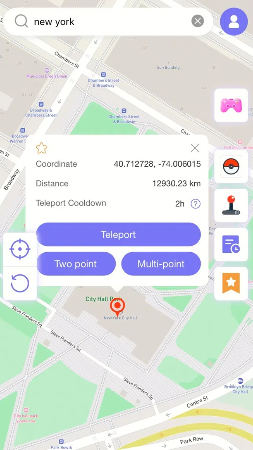
You can instantly jump to any location worldwide by searching for an address or entering precise GPS coordinates. This is ideal for reaching rare spawn zones or joining remote raids without leaving home. The built‑in cooldown timer shows you exactly how long you must wait before interacting with the game, helping you avoid rushed actions and, most importantly, keeping your account safe from Niantic’s impossible travel flags.
3. Natural Movement Simulation
MocPOGO simulates real human walking and running patterns in Pokémon GO with adjustable speeds to match natural movement patterns. It avoids abrupt teleport jumps or unnatural speed changes, greatly lowering your account risk of being flagged or banned.
4. No Pokemon Go Error 12 Issue
MocPOGO eliminates the frustrating Failed Detect Location Error 12 that plagues most spoofing tools. It bypasses the game’s anti-spoofing checks, ensuring stable GPS detection without triggering location errors.
5. Go Catcher
Act as a built-in Pokémon GO Plus+ inside MocPOGO. With Auto Catch active, you can focus entirely on planning your custom routes, walking, egg hatching, and exploring, while the tool auto-catches Pokemon and spins Pokestops in the background.
6. Pokemon Resource Search & Scan
Quickly scan nearby Pokémon and active raids in your surroundings, displaying important details like CP, IV, level, moveset, distance, and despawn time. You can also search for any specific Pokémon or raid by name, tier, or ID.
7. POGO Assistant for iOS
iOS-friendly POGO Assistant streamlines your Pokémon GO gameplay, reduces tedious repetitive tasks with Auto-Raid, Quick Spin, and Auto Hatch Eggs. It allows you focus more on strategy, collection, and exploration with Skip Animations, Auto Max Battle.
Simple Steps to Play Pokémon Go Safely with MocPOGO
Step 1 Download and install MocPOGO app on your Android or iPhone.
Step 2 Choose your preferred movement method. Use Teleport Mode to jump instantly to any location, or select Two-Spot / Multi-Spot Mode to create a natural walking route.
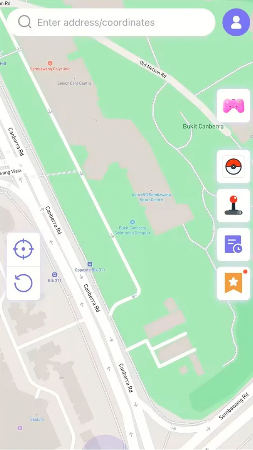
Step 3 Enter your target location (city name or GPS coordinates) and tap Teleport.
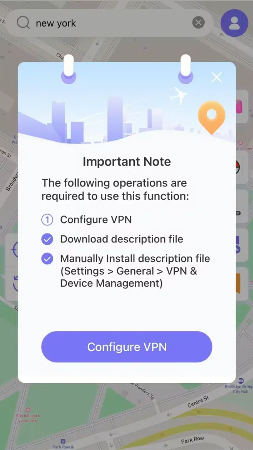
Step 4 MocPOGO for iOS will ask you to configure VPN, click on “Configure VPN” to go on.
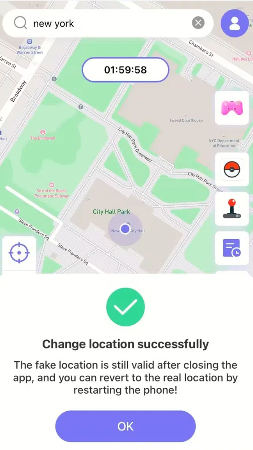
Step 5 Your location will be changed to there. Open Pokémon GO, your in-game character will now appear at the new location.
(Optional): For an even smoother experience, you can enable extra features like GPX route import, joystick control, Go Catcher, or POGO Assistant. These functions work perfectly alongside the official app and help you play more efficiently without risky behavior.
Conclusion
Getting locked out of your Pokémon GO account is frustrating, but most accounts can be recovered. Whether you lost access to your email or forgot your login method, Niantic provides ways to get back in.
Once you’re back, keeping your account safe should be your top priority. The best way to avoid future risks is to play smart, use natural movement, respect cooldowns, and avoid anything that looks suspicious to Niantic’s systems.
MocPOGO stands out as a practical, all‑in‑one GPS tool that lets you explore more of the Pokémon world while keeping your account safe. With teleport tools, route simulation, and Pokémon‑specific features, MocPOGO helps you play smarter and more efficiently.


