
LocaChange Review 2026: Features, Pricing, and Whether It’s Worth It

Pokémon GO players spend real time and money chasing Pokémon that live thousands of miles away. That’s the whole reason GPS spoofing apps exist, and LocaChange is one of the names that keeps coming up in 2026. It promises to move your phone’s location anywhere in the world, all without jailbreaking or rooting your device. But does it actually work as well as the marketing page says? And is $19.99 a month a fair price for it?
This review walks through LocaChange’s features, pricing, safety, and how it stacks up against other tools on the market.

What Is LocaChange?
LocaChange is a GPS location changer built for iPhone, Android, and desktop computers. It works by changing the GPS data your phone sends to apps, so your device believes it is sitting somewhere else entirely. This LocaChange review looks at how the app performs for real players, not just what the sales page promises.
LocaChange does its work at the system level, not through a VPN. A VPN only hides your internet connection, but location-based games like Pokémon GO read GPS coordinates straight from your phone’s operating system. LocaChange feeds different coordinates into that system, so apps like Pokémon GO, Google Maps, and dating apps read them as if they were real.

While Pokémon GO players make up most of its audience, LocaChange also gets used for things like testing location-based apps before launch, checking how a service looks from a different country, or simply keeping a real address private on social media. The core skill is the same in every case: it convinces your phone’s operating system that you are somewhere you aren’t, without touching the phone’s actual hardware or requiring any risky software changes.
LocaChange Key Features
LocaChange packs a long list of tools into one app. Here are the main ones:
- Teleport & Jump Teleport: Move your location instantly to any spot on the map, no walking required.
- Two-spot & Multi-spot: Plan a simple route between two points, or map out several stops along a longer path.
- 360° Joystick: Control your movement in real time with an on-screen joystick, which looks more natural than a straight jump.
- Cooldown Timer: Add a short pause between location changes, so your movement pattern looks less robotic.
- PoGo Atlas & PoGo Search: Atlas plots nearby Pokémon, raids, G-Max and D-Max battles, routes, PokéStops, and gyms on the map and can generate a route in one tap. Search adds filters for name, number, and IV, and can push notifications when an IV100 appears nearby.
- Virtual Go Plus: Auto-catch Pokémon and auto-spin PokéStops, with support for Poké Balls, Great Balls, and Ultra Balls. Note that this one requires an SVIP plan plus Go Finder to unlock.
- PoKo Assistant: Adds Auto Raid, Auto Rocket Battles, and Enhanced Throw to speed up daily tasks. Like Virtual Go Plus, it needs an SVIP plan plus Go Finder.
- Up to 10 devices: On the desktop plan, one license covers unlimited PCs and Macs plus up to 10 iPhone and Android devices. The standalone iOS app covers a single iPhone, and the paid Android app has no device cap.
- Import/Export GPX: Load pre-made GPX route files, or save your own custom routes to reuse later.
That’s a solid feature list for anyone who plays location-based games. But a long feature list doesn’t automatically mean a great app in daily use, so let’s look at where LocaChange actually shines and where it comes up short.

LocaChange Pros and Cons
Any honest LocaChange app review needs to cover both the good and the bad. Here’s where LocaChange stands out, and where it doesn’t.
Pros:
- Works across iPhone, Android, and desktop, so you’re not locked into a single device type.
- No jailbreak or root needed, which keeps your phone’s warranty and built-in security features intact.
- The joystick and multi-spot tools make movement look far more natural than a plain teleport.
- Built-in tools like PoGo Atlas save time hunting for good spawn points across the map.
- The interface is simple enough that a first-time user can figure it out within a few minutes.

Cons:
- The $19.99 monthly price sits on the higher end for this category of app.
- Some users report the connection dropping during longer play sessions, especially on older phones.
- Frequent game updates can temporarily break spoofing tools until the developer pushes a fix.
- Managing more than 10 devices at once means switching to a different tool entirely.
None of these downsides are dealbreakers on their own. Now, before you write LocaChange off, it’s worth seeing exactly what that $19.99 buys you.
How Much Does LocaChange Cost?
LocaChange runs on a subscription model. Based on the official LocaChange pricing page, the current tiers are $19.99 per month, $39.99 per quarter, $79.99 per year, and $119.99 for a lifetime license. Every paid plan unlocks the same features, so the difference is only how long you plan to stay. Purchases are backed by a 30-day money-back guarantee and can be cancelled at any time. Pricing on tools like this tends to shift without much notice, so check the live numbers before you commit.
| Plan | Price | Best For |
|---|---|---|
| Free trial | Each mode once, joystick 15 minutes | Testing whether the app works on your device |
| Monthly | $19.99 / month | Players who want to test the app short term |
| Quarterly | $39.99 / quarter | Players who spoof a few times a week |
| Annual | $79.99 / year | Players planning to use the app all year |
| Lifetime | $119.99 one-time | Players who want no renewal to think about |
A monthly price close to $20 puts LocaChange in the mid-range for GPS spoofing software. It’s not the cheapest tool on the market, but it’s also nowhere near the priciest. Whether that price feels worth it really comes down to a few honest questions: how many devices you need to run, how often you actually play in a given month, and how much you value features like PoGo Atlas over a bare-bones teleport tool.
Is LocaChange Safe?
This question comes up in nearly every LocaChange review, and it deserves a straight answer: it depends on which “safe” you mean. On the technical side, the app works the same way most system-level GPS changers do, and there are no public reports of malware or of it collecting personal data beyond what any location app needs. It also runs without a jailbreak or root, so your device’s own security model stays in place.
The real risk is not the app itself, it is Pokémon GO’s terms of service. The game bans GPS spoofing of any kind, and using a tool like LocaChange breaks those rules regardless of how well the app is built. The developer watches for patterns like sudden long-distance jumps or travel speeds that are not possible in the time between two actions, and it does issue penalties to repeat offenders.

LocaChange’s cooldown timer and joystick mode are built around that problem. The cooldown timer puts a wait between big location jumps, which matches the time a real player would need to travel between two spots. The joystick works the same way, moving your position gradually across the map instead of snapping from one place to another in a single step.
What Real Users Say
Player feedback on LocaChange tends to follow a consistent pattern. Users often praise how quick the first-time setup is and how reliably the teleport function works right out of the box, and multi-device support earns regular thanks from players who manage more than one device. The free trial is also a common positive talking point: it lets you run each movement mode once and use the joystick for 15 minutes, so you can confirm the app works on your phone before paying anything.

On the flip side, the most common complaint centers on connection stability during long play sessions, particularly right after big Pokémon GO updates. A smaller group mentions a learning curve around the advanced tools, like planning routes with GPX files. Some users also report iOS setup trouble, including Bluetooth pairing failures and the location reverting once the connected computer is switched off. If you hit that, the 30-day refund window is worth using rather than waiting for a fix.
Best LocaChange Alternative: MocPOGO
If LocaChange’s price tag or connection issues are holding you back, MocPOGO is worth a look. It is a location changer for Pokémon GO and other location-based apps, and it covers the same core ground as LocaChange: teleport, joystick, multi-spot routes, GPX import, and a cooldown timer.
The differences show up in three places. MocPOGO handles up to 15 devices on one plan instead of 10, its Go Catcher and POGO Assistant come with the plan rather than needing a separate add-on, and iPhone users get Native Mode for running the official Pokémon GO app. Which of those matters depends on how many devices you run and how much of your playtime goes into catching and spinning.
168,282 people have downloaded it.
- Change GPS location on iOS device without jailbreak.
- Simulate GPS movement with custom speeds.
- Change the location of all location-based games/apps.
- Newly released Native Mode: spoof iOS location without modded apps for all LBS apps safely.
- Multi-device control for up to 15 devices.
- Support the latest iOS 27/Android 17.
What Makes MocPOGO a Better Choice
- More Stable Connection: Built to hold up during longer sessions, even right after major game updates.
- No Jailbreak or Root Required: Same safety standard as LocaChange, so your device stays untouched.
- Import GPX: Load your favorite route files just like you would with LocaChange.
- Native Mode for iPhone: Spoof your location inside the official Pokémon GO app, with no modified game version needed.
- Built-in Cooldown Timer: Adds natural pauses between moves to help lower ban risk.
- Go Catcher: Auto-catches Pokémon and auto-spins PokéStops, working a lot like a virtual Pokémon GO Plus device.
- POGO Assistant for iOS: A bundle of extra tools, including IV checks and a quick-throw option for better catch rates.
- Up to 15 devices: Five more than LocaChange supports, which matters for anyone running multiple accounts at once.
How to Use MocPOGO as Your LocaChange Alternative
General Mode
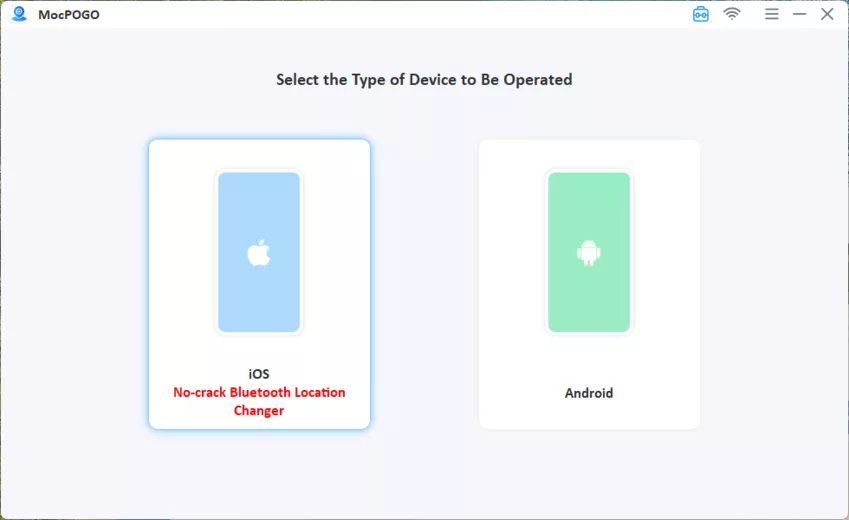
Step 1 Download and launch MocPOGO on your Windows PC, then select General Mode from the main interface.

Step 2 Connect your device and then select iOS or Android.
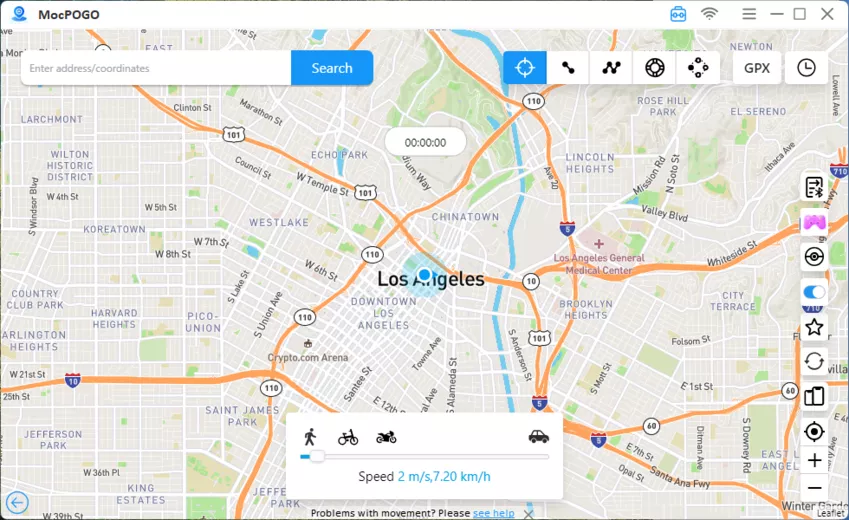
Step 3 Enter the location you want and click Search.
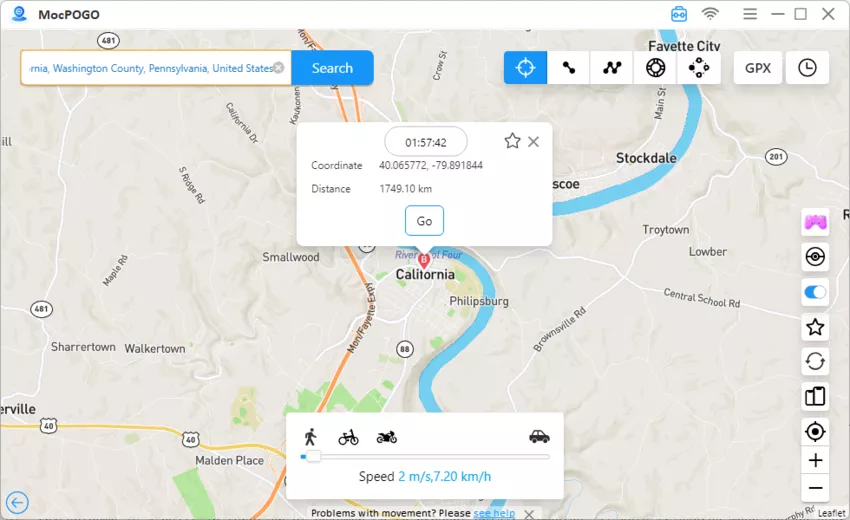
Step 4 Click GO to instantly spoof the location. Open Pokémon GO, and your location will be changed to the selected location. Now, you can catch Pokemon in a new location. You can also use the Joystick to move on the map and catch Pokemon around.
Native Mode (iOS only)
Step 1. Download and launch the MocPOGO iOS app and select Native Mode from the bottom of the screen.

Step 2. Enter your target city or coordinates in the search bar, or tap any desired spot on the map. Tap Teleport.

Step 3. Set up the required VPN connection and trust the certificate. (This is a one-time setup for first use only.)

Step 4. Your iPhone GPS will update to the target location immediately. The spoofed location remains active even after you fully close the MocPOGO app.

Summary
LocaChange is a solid, easy-to-use GPS changer with a strong feature set, though its $19.99 monthly price and occasional connection hiccups are worth weighing before signing up. If you are still deciding, the free trial runs each mode once, and the 30-day refund window covers the paid plans.
If those trade-offs matter to you, MocPOGO Location Changer covers the same core ground and adds room for five more devices, with Go Catcher and POGO Assistant included rather than locked behind an add-on. Pick the plan that matches how many devices you run, then start with the trial before committing to a longer tier.