


iMyFone AnyTo Review 2026: What It Does Well, Where It Falls Short

iMyFone AnyTo is one of the best-known GPS location changers, used for Pokémon GO, for keeping apps away from your real position, and for reaching content that changes by region. What decides whether it is worth the money is how it behaves in practice: what the modes actually do, what the ban risk looks like now, and how the plan tiers are priced.
This review walks through the features, the pros and cons, the ban risk, and the pricing, then puts MocPOGO next to it. The two are priced differently on desktop and on iPhone, so the comparison you need depends on which one you play on.

Part 1. What Is iMyFone AnyTo?
iMyFone AnyTo is a GPS location changer. It lets you pick any spot on a map, and your apps then see that spot instead of your real one.
The setup runs through a desktop client on Windows or Mac. You install it, connect the phone by USB, Wi-Fi, or Bluetooth, and drop a pin on the map, and the phone’s location moves there. The main selling point is that no jailbreak or root is required, so the phone’s own protections stay in place. iMyFone also lists separate iOS and Android apps, though the iOS one is obtained through the desktop client.

Three Groups Get the Most Out of It
- Game players who want to reach Pokémon GO spawns or raids in other places.
- Privacy-minded users who do not want apps tracking their real position.
- People who want regional content, such as apps that show different results by country.
The official page lists the supported systems. On phones, it says iOS 5 and up, iOS 27 Beta included, and Android 6.0 and up, Android 17 included. On computers, it lists Windows 11 down to 7, and macOS 10.9 to 14. You need about 500 MB of free disk space, and the connection can run over USB, Wi-Fi, or Bluetooth.
Part 2. iMyFone AnyTo Core Features
This AnyTo app review sticks to the official feature list and to what independent reviewers report. Here is what the tool offers.
- Teleport: You jump to any place on Earth with one tap. It is the fastest mode, and the one that covers the longest distance in a single step.
- Two-Spot mode: You pick a start point and an end point. The phone then moves along a route between them. AnyTo’s page lists adjustable speeds from 3.6 km/h to 120 km/h. For scale, a normal walk is around 5 km/h.
- Multi-Spot mode: You set several stops and the phone visits them in order. This helps if you want a longer route.
- Joystick: You steer your position by hand, in any direction, using a 360° control. It feels like moving a character in a game.
- GPX route import: GPX is a common file type for saved GPS routes. You can load a route from another app and replay it.
- Multi-device control: The official page says you can manage up to 10 devices at once on PC or Mac. The purchase page ties that limit to the higher tier. The standard plan allows up to 5 phones.

SVIP Extras for Pokémon GO Players
- A cooling timer, which counts down the wait before your next move.
- An auto-catcher, which catches Pokémon for you.
- An IV scanner, which shows a Pokémon’s hidden strength stats.
- Pokémon GO maps, which show where Pokémon are.
Which mode fits which job? Teleport suits a quick change, such as checking how an app looks from another city. Two-Spot and Joystick suit games, because they move the position continuously instead of jumping it. Multi-Spot and GPX suit routes you want to repeat.
Part 3. iMyFone AnyTo Pros and Cons
Every tool has trade-offs. Here is how AnyTo scores.
Pros
- Easy map interface: You search, click, and go. Reviews of the desktop client repeatedly call the interface simple to use.
- No jailbreak or root: Your phone’s security settings stay as they are.
- Good support materials: The brand offers guides and help pages for common problems.
- Wide version support: It lists iOS 5 and up and Android 6.0 and up, so older phones are covered.
- Beginner-friendly: You do not need technical skills to move a pin.
Cons

- The iOS route still starts on a computer: iMyFone’s page says AnyTo works with or without a PC and lists a separate iOS app, but that app is obtained through the desktop client, and reviews of earlier versions report that spoofing on iPhone only worked while the phone was tethered to a computer. Worth confirming before you buy on the strength of the standalone app.
- Higher monthly price: The VIP plan is listed at $14.99 a month, and the SVIP tier that carries the Pokémon GO tools costs more. Both are above several rivals.
- Regional and compatibility issues: Some users report problems on newer iOS versions and in certain regions.
- Detection risk in games: Using it in Pokémon GO can lead to account penalties.
- Connection problems: Some users report GPS failing beyond about 20 km and unstable connections.
Part 4. Is iMyFone AnyTo Safe?
Two different questions hide inside this one. One is about the software. The other is about your game account.
Is It a Scam?
No. iMyFone is an established developer. AnyTo has an official website, public pricing, and a refund policy. The purchase page lists a 30-day refund on each plan. The FAQ says the money-back guarantee applies if the company cannot solve your technical problem, so it is not unconditional. One independent reviewer also noted the software appeared free of malware and did what it claimed.
Device Safety
The tool does not need a jailbreak or root. That keeps your phone’s core protections in place. Still, you are connecting your phone to software and sharing a fake location with apps. Download only from the official site.
Is iMyFone AnyTo Safe for Pokémon GO?
This is where caution is needed. The software may be legitimate, but the game does not allow what it does.
Pokémon GO is now run by Scopely Explore, which took over Niantic’s games business. Its terms, effective July 15, 2026, list “using any techniques to alter or falsify a device’s location (for example through GPS spoofing)” as cheating. The terms also let the company suspend or end an account at its sole discretion.
Real-world reports add to the concern:
- Some users say the app stops working with certain games or after iOS updates.
- One review reported that iOS restored the real location after about 3 to 6 hours.
- The same review said heavy teleport use could get an account flagged.
- When the phone is linked to a computer, a cable or connection drop can interrupt the changed location.
The fair conclusion is this: AnyTo is not a scam, but the spoofer is not risk-free in Pokémon GO.
Part 5. iMyFone AnyTo Pricing: Is It Worth $14.99/Month?
AnyTo sells monthly, yearly, and lifetime plans. The monthly plan starts at $14.99 (check the current page — discounts and pricing change often). Longer plans cost less per month, and discounts appear often.
The plans differ mainly by device count. The standard tier covers up to 5 phones, and SVIP covers up to 10. The free version is a compatibility check rather than a trial: each movement mode is limited to a small number of uses, with roughly 15 minutes of joystick time on the PC version. Check the current page, since these limits have changed between versions.
Here is a simple calculation. At $14.99 a month, six months cost $89.94. A $9.95 monthly plan costs $59.70 over the same period. That is a gap of about $30. Over twelve months, the gap grows to about $60.
So is it worth it? For a one-time trip or a short test, the monthly price is easy to accept. For regular use, the cost adds up. A long plan or a cheaper rival may make more sense.
Part 6. Best iMyFone AnyTo Alternative: MocPOGO
MocPOGO is a location changer that targets the weak spots listed above. It is built for iPhone and Android, with extra tools for Pokémon GO players.

168,282 people have downloaded it.
- Change GPS location on iOS device without jailbreak.
- Teleport instantly to any place with one click.
- Simulate GPS movement with custom speeds.
- Change the location of all location-based games/apps.
- Newly released Native Mode: spoof iOS location without modded apps for all LBS apps safely.
- Multi-device control for up to 15 devices.
- Support the latest iOS 27/Android 17.
Advantages of MocPOGO
- ✓Lower price: MocPOGO starts at $9.95 a month, compared with AnyTo’s $14.99. You can see current plans on the MocPOGO purchase page. That is about a third less.
- ✓Change location on iPhone without a computer: MocPOGO offers a dedicated iOS app that runs directly on your iPhone. You do not need to keep the phone tied to a computer. This removes the biggest complaint iPhone users have about AnyTo. Note that MocPOGO’s own pricing table says the iOS app lacks Bluetooth mode and GPX import. Those stay on the desktop version.
- ✓Native mode: It changes your GPS location directly on the official Pokémon GO app. You do not need a modded app.
- ✓Go Catcher: It works like a virtual Pokémon GO Plus+. It catches Pokémon and spins PokéStops for you, without a physical device.
- ✓POGO Assistant for iOS: This add-on includes Show IV, Quick Catch, Auto Raid, Auto Dynamax Battles, and Auto Hatch Eggs. A company press release from April 2026 describes these tools. It also says the assistant works with a customized Pokémon GO app.
- ✓Cooldown timer: It tracks safe wait times between locations. That helps you avoid the soft bans that come from jumping too far, too fast.
- ✓Connect up to 15 devices at once: MocPOGO supports up to 15 devices at the same time. That is useful for families, teams, or anyone with several phones.
How to Use MocPOGO as Your iMyFone AnyTo Alternative
Step 1 Download and launch MocPOGO on your Windows PC, then select General Mode from the main interface.

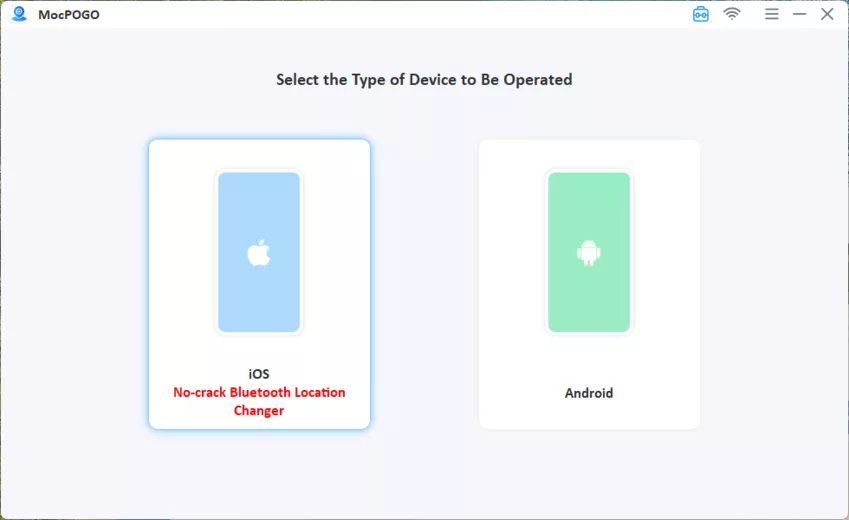
Step 2 Connect your device and then select iOS or Android.
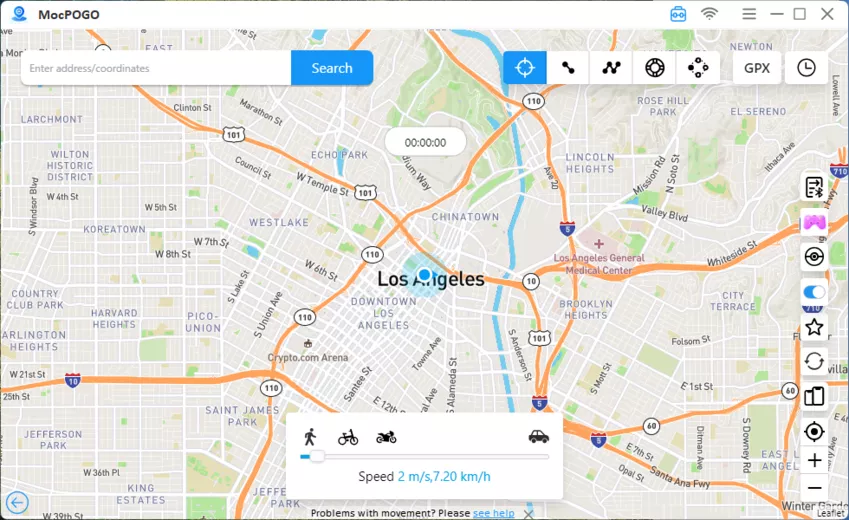
Step 3 Enter the location you want and click Search.
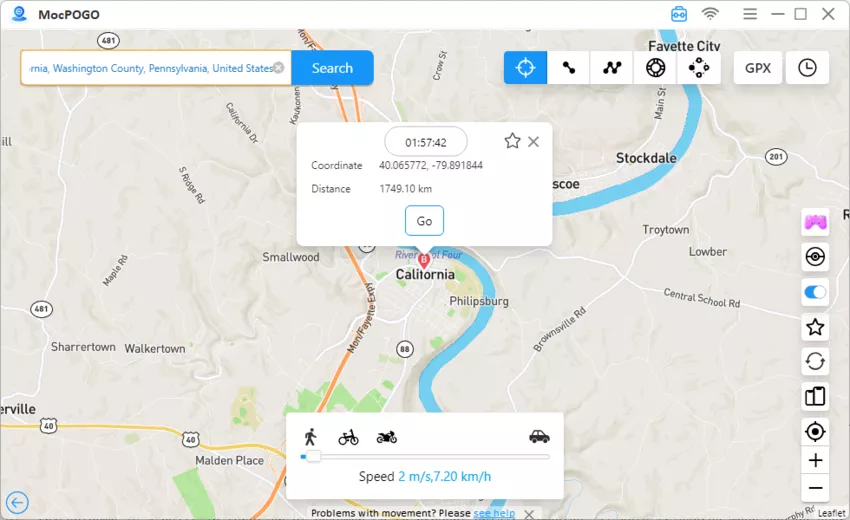
Step 4 Click GO to instantly spoof the location. Open Pokémon GO, and your location will be changed to the selected location. Now, you can catch Pokémon in a new location. You can also use the Joystick to move on the map and catch Pokémon around.
Summary
iMyFone AnyTo is a legitimate, beginner-friendly tool with wide version support. Its weak points are the SVIP paywall on the game tools, the desktop-first setup on iPhone, and the usual Pokémon GO risk that comes with any location changer. MocPOGO answers several of those: the Windows desktop plan starts at $9.95 a month, it handles up to 15 devices, and the iOS app changes location without a computer attached.
Which one wins depends on where you play. Desktop and multi-device users get the clearest saving from MocPOGO; if you are iPhone-only, compare that tier carefully, because the prices there are much closer.