
Pokémon GO Speed Limit Explained: Caps, Cooldowns & Faster Egg Hatching

An incubated Egg can sometimes stay stuck after considerable movement. You may walk farther, yet the distance barely changes. That situation often raises questions about the Pokémon GO speed limit and how movement gets recorded. Speed matters because the game doesn’t treat every type of travel equally. Moving too quickly can reduce distance credit for Eggs or Buddy progress. Teleporting creates another issue because location changes involve separate cooldown considerations. Once you understand both systems, movement becomes easier to manage.
In this guide, you’ll learn how speed caps work, how cooldowns differ, and how to hatch eggs more efficiently.

Part 1. What Is the Pokémon GO Speed Limit?
Fast movement doesn’t always help your Eggs hatch sooner. Pokémon GO generally records walking-style movement more consistently during active gameplay. Community testing commonly recommends staying around 10-10.5 km/h (about 6.5 mph), although the game’s publisher hasn’t officially published that number as a fixed cap.

In practical terms, the speed guideline works like this:
- Around 10 km/h provides dependable results for many walking routes.
- Speeds above that range may receive reduced or no distance credit.
- Slower movement tracks better when GPS accuracy fluctuates.
- Long, straight stretches record more distance than tight loops, because distance is measured between two position checks.
The purpose is straightforward: Pokémon GO needs to tell walking apart from driving. Speed filtering keeps distance-based progress tied to movement the game considers walkable, which is why a bus ride across town does almost nothing for an incubated Egg.
What Does the Pokémon GO Speed Limit Affect?
Several features depend on recorded movement rather than simple GPS position:
- Egg distance: Only credited movement advances an incubated Egg.
- Buddy Candy: Recorded walking contributes toward Buddy distance requirements.
- Walking tasks: Research and event tasks that ask you to walk a set distance use the same tracking.
- Adventure Sync: Supported fitness data can record kilometers while the app closes.
- Weekly activity: Properly recorded distance contributes toward weekly walking totals.

What Happens If You Exceed the Speed Limit?
Going faster than the recommended range affects tracking first, not your account. Distance for that interval is usually dropped rather than delayed, so the loss is permanent for that segment. Crossing 10.5 km/h does not automatically trigger a ban; the game simply stops crediting the distance. If you suspect you tripped a soft ban, the usual behavior is temporary: it clears on its own, typically anywhere from a few minutes up to about two hours.

Part 2. Speed Caps vs. Cooldowns: What’s the Difference?
Speed caps and cooldowns often get mixed together. However, each concept affects gameplay differently and solves a completely separate movement problem.
What Is a Speed Cap?
A speed cap is the maximum movement rate a game allows before certain location-based calculations change. In Pokémon GO, it acts as a threshold for how movement data is interpreted during play. Once movement passes that threshold, the game may treat the activity differently instead of processing it like normal walking. Think of it as a filter that separates ordinary movement from faster travel.

What Is a Cooldown?
A cooldown is a waiting period used after changing your GPS location over a significant distance. It gives the game time before you perform another location-based action, such as catching a Pokémon or spinning a PokéStop. Cooldown length is generally based on travel distance, not walking speed.
Teleporting on its own does not start the timer; the timer is tied to actions taken at the new location, while hatching Eggs, opening gifts, trading, and claiming research rewards do not restart it. These timings come from community testing rather than an official chart.
Pokémon GO Community Cooldown Timing Table
Cooldown time usually increases as the teleport distance becomes longer. The timings below come from long-standing community testing, not official Niantic documentation. Use them as practical estimates rather than guaranteed limits.
| Teleport Distance | Suggested Cooldown Time |
|---|---|
| 1 km | 30 seconds |
| 5 km | 2 minutes |
| 10 km | 6 minutes |
| 25 km | 11 minutes |
| 30 km | 14 minutes |
| 50 km | 20 minutes |
| 65 km | 22 minutes |
| 81 km | 25 minutes |
| 100 km | 35 minutes |
| 250 km | 45 minutes |
| 500 km | 1 hour |
| 750 km | 1 hour 20 minutes |
| 1,000 km | 1 hour 30 minutes |
| 1,500 km or more | 2 hours |
Part 3. How to Avoid Soft Bans: Speed & Cooldown Rules
Soft bans usually become a concern when movement looks unrealistic or cooldown timing is ignored. Following a few simple speed and waiting rules can help you move more carefully and avoid unnecessary gameplay restrictions.

Rule 1: Stay Around 10-10.5 km/h for Distance Tracking
For reliable distance tracking, keep your movement around 10-10.5 km/h. This range matches normal walking speed and is what the game’s tracking is built around. A steady pace also matters because distance is checked in intervals: an uneven pace with fast stretches can cost you the distance recorded in that interval.
Rule 2: Respect the Cooldown After Teleporting
Wait for the suggested cooldown based on travel distance; longer jumps call for a longer wait before catching Pokémon or spinning PokéStops.
Rule 3: Recognize Common Signs of a “Soft Ban”
Recognizing a soft ban early saves you from repeating actions that will not work. Common signs include Pokémon fleeing on the first throw, PokéStops returning nothing, and location-based features behaving strangely. If several signs show up together, pause for a while and let it clear.
Part 4. How to Hatch Eggs More Efficiently Within the Speed Limit
A 10 km Egg takes real distance, and a 12 km one takes more. If your usual route is a loop around the block, or the weather keeps you indoors, that distance adds up slowly, and the incubator sits occupied while other Eggs wait.
MocPOGO is a location changer for Pokémon GO, and it handles the movement part. You can draw a route, set the pace, and let your avatar walk it while the game records distance, so Eggs progress even on days you do not head outside. It works on Windows, Mac, iPhone, and Android, and it does not hatch the egg for you: it covers the walking.

168,282 people have downloaded it.
- Change GPS location on iOS device without jailbreak.
- Simulate GPS movement with custom speeds.
- Teleport instantly to any place with one click.
- Change the location of all location-based games/apps.
- Track safe waiting time via built-in cooldown timer.
- Newly released Native Mode: spoof iOS location without modded apps for all LBS apps safely.
- Multi-device control for up to 15 devices.
- Support the latest iOS 27/Android 17.
How to Use MocPOGO to Hatch Eggs Within the Speed Limit
Step 1 Download and launch MocPOGO on your Windows PC or Mac, then select General Mode from the main interface.

Step 2 Connect your device and then select iOS or Android.
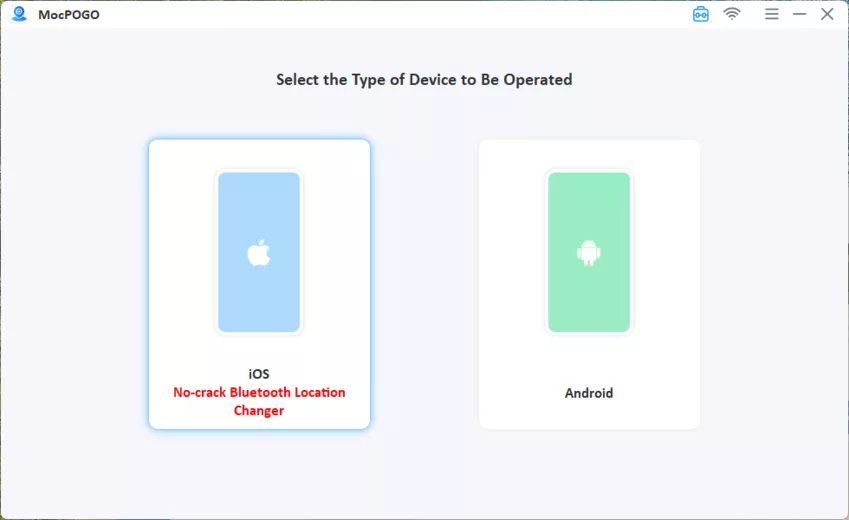
Step 3 Choose Two-Spot Mode for a straight walk or Multi-Spot Mode for a custom loop. Then click points on the map to build your route.

Step 4 Drag the speed slider to about 8-9 km/h, slightly under the 10.5 km/h tracking threshold, and click Go. Open Pokémon GO and your Egg distance updates as your avatar follows the route.

Conclusion
Understanding the Pokémon GO speed limit can help you manage Egg progress more effectively. Staying near 10-10.5 km/h may support steadier distance tracking during movement, while cooldowns become important after major location changes. Following recommended cooldown periods and watching for unusual gameplay behavior can help you avoid unnecessary issues. Accurate GPS and a properly working Adventure Sync are also important for consistent Egg progress.
If you want more control over virtual movement, MocPOGO Location Changer provides a convenient way to manage routes and movement without relying on outdoor walking. You can use it to plan virtual movement and make your Egg-hatching sessions more convenient.