
Best LocaChange Alternatives: 5 GPS Spoofers Compared for iOS & Android

LocaChange is a well-known GPS spoofer, but it is not the only choice. Its price and its need for a computer send some players looking elsewhere. This guide compares five LocaChange alternatives for Pokémon GO on iPhone and Android, covering what each one costs, which platforms it runs on, and whether it needs a computer. It ends with what “safe” really means, since the game does not allow spoofing.
What Is LocaChange?
LocaChange is a desktop program that changes the GPS location of your phone. You install it on a Windows PC or a Mac, plug in your iPhone or Android phone, and pick a spot on the map. Apps on the phone then believe you are standing there. The official site lists support for iOS 14 to 26.4 and Android 8 to 16.

Key features
- Teleport and jump teleport: Move to any place in one click, or hop through a list of places.
- Route modes: Two-spot and multi-spot routes move your phone along a path at a speed you choose.
- Joystick: Steer your character by hand instead of following a fixed route.
- Pokémon GO mode: A built-in mode for Pokémon GO with cooldown reminders.
- Multiple devices: The site says one plan can cover up to 10 devices.
LocaChange Pros and Cons
LocaChange covers a lot, from teleporting to joystick control. It also has a few limits, such as price and setup, that matter most to beginners.
LocaChange pros
- Works with iOS and Android, on Windows and Mac.
- Puts teleport, routes, and joystick control in one program.
- Includes a mode built for Pokémon GO.
- Offers a free trial, so you can test it first.
- Backed by a 30-day money-back guarantee on paid plans.
LocaChange cons
- It costs more than most rivals. One independent review lists the monthly plan at $19.99.
- Most tasks need a computer, so it is not a phone-only tool.
- The free trial is short. Joystick mode lasts only 15 minutes.
- Some reviewers report trouble with refunds, cancellations, and updates for new phone software.
These gaps explain why many players compare other tools. The five below cover different needs. Some save money. Some add features. Some keep setup simple.
Top 5 LocaChange Alternatives
We compared each tool on features, price, platform support, and how well it works with the official game app.
1. MocPOGO: Best Overall LocaChange Alternative
Why it is the top pick
MocPOGO covers the same core movement modes as LocaChange and adds a few extras. It runs on iPhone and Android, with desktop apps for Windows and Mac. Its official site lists the desktop plan at $9.95 a month, marked down from $19.95. LocaChange’s monthly price in one review is $19.99. If that discount holds, you save about $10 a month, or roughly $120 a year. Prices change, so check the current page before you buy.
Price is not the only edge. MocPOGO can control up to 15 devices, while LocaChange lists 10. It also has a Native Mode for iPhone, which works with the original apps.
168,282 people have downloaded it.
- Change GPS location on iOS device without jailbreak.
- Teleport instantly to any place with one click.
- Simulate GPS movement with custom speeds.
- Change the location of all location-based games/apps.
- Newly released Native Mode: spoof iOS location without modded apps for all LBS apps safely.
- Multi-device control for up to 15 devices.
- Support the latest iOS 27/Android 17.
MocPOGO pros
- Covers iOS and Android, with Windows, Mac, and phone-app options.
- A Cooldown Timer helps you pace movement between jumps.
- Resource search saves time when you hunt for spawns and raids.
- Its listed monthly price is lower than LocaChange’s.
- A free trial lets you test it first.
MocPOGO cons
- The cooldown timer works only with Teleport, not with route modes.
- Bluetooth and Native Mode take a few more steps than a plain USB cable.
- GPX import is not in the phone apps.
How to Use MocPOGO as Your LocaChange Alternative
Step 1 Get MocPOGO from the official site. Install it on your Windows PC or Mac, open it, and choose General Mode. iPhone users who want to avoid modified apps can pick Native Mode and follow its guide.

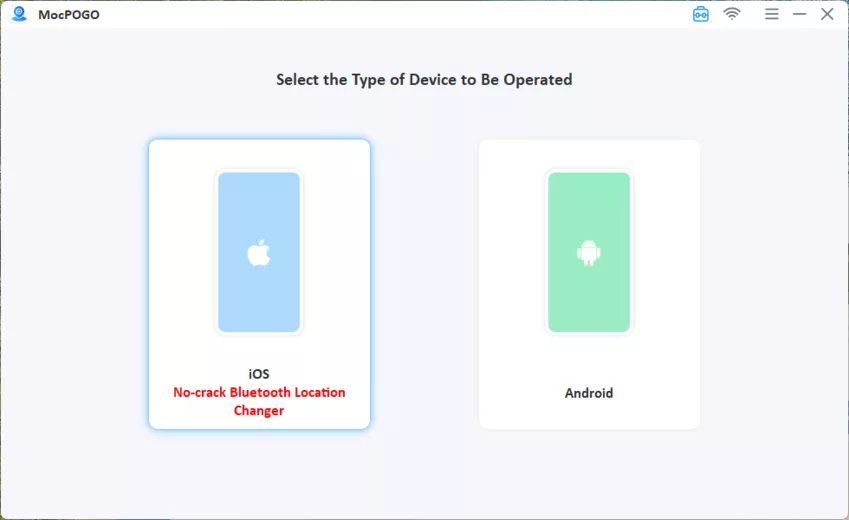
Step 2 Connect your device and then select iOS or Android.
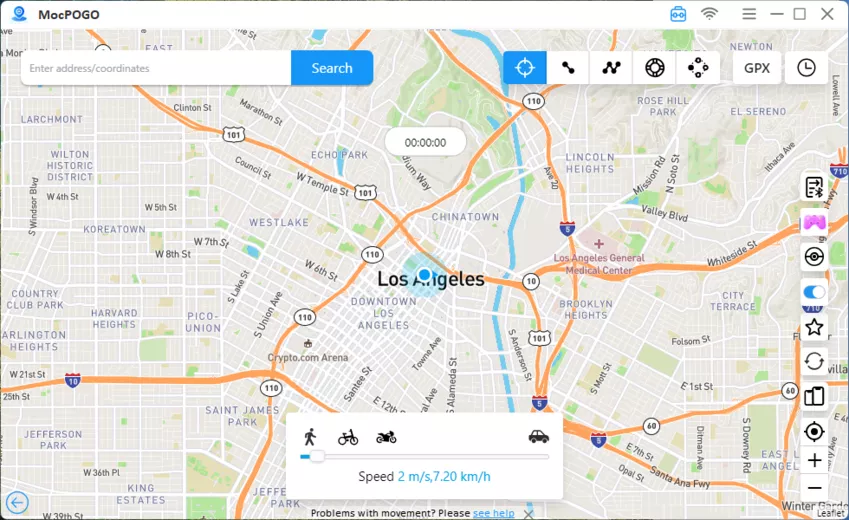
Step 3 Enter the location you want and click Search.
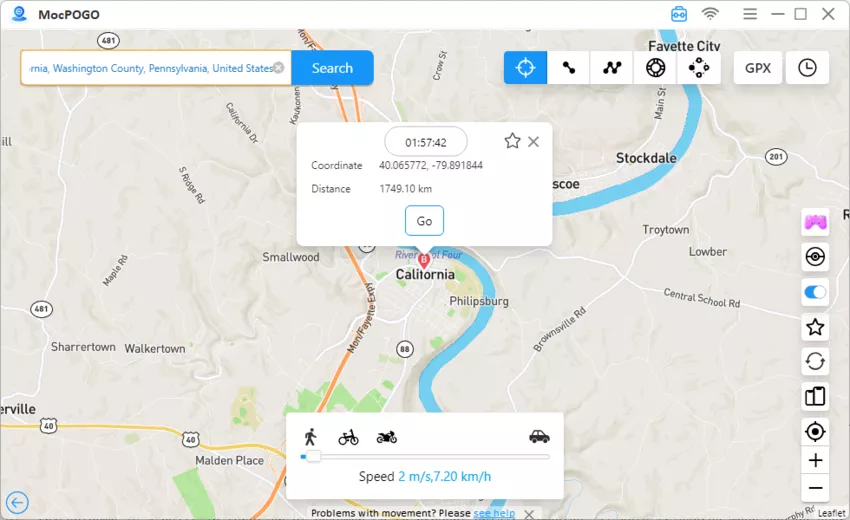
Step 4 Click GO to instantly spoof the location. Open Pokémon GO, and your location will be changed to the selected location.
2. FonesGo Location Changer
FonesGo Location Changer is a close rival with a very similar feature list. It works on iPhone and Android through a Windows or Mac program. Its official site says it supports iOS 27 and Android 17.

Key features
- Movement modes: Teleport, jump teleport, two-spot, and multi-spot routes.
- Joystick and speed: 360-degree control with speeds up to 100 km/h.
- Multi-device control: Up to 15 devices over USB or Wi-Fi.
- Extras: GPX import and export, a cooldown timer, history, and favorites.
Pros
- Wide feature set with no jailbreak or root.
- A 2025 announcement says it can change an iPhone’s location from an Android app over Bluetooth.
- Handy route and history tools.
Cons
- The free trial is limited.
- Full features need a paid plan.
- The main version needs a computer.
- Its features closely match MocPOGO’s, so it adds little that is new.
3. iToolab AnyGo
iToolab AnyGo is one of the most trusted spoofers among Pokémon GO players, and it has been around long enough to earn that reputation. It also supports Bluetooth spoofing, so once paired, you can change your GPS position over a Bluetooth connection instead of relying on a wired one.

Key features
- Movement modes: Teleport, two-spot, multi-spot, and joystick.
- Speed control: Set a walking, cycling, or driving pace.
- GPX routes: Import files and save favorite routes.
- Older iPhones: Support reaches back to iOS 7.
Pros
- Good choice if you still use an older iPhone.
- Long track record and a legitimate product, not malware, according to one independent review.
- Wi-Fi connection means fewer cable problems.
Cons
- Prices vary. Reviews list monthly plans from $9.95 to $15.96, so check the live page.
- Reviews give different device limits, from 3 to 15. Confirm what your plan allows.
- On a brand-new phone, verify compatibility first, because the vendor’s claims may run ahead of tested support.
4. PoKeep
PoKeep is a desktop location changer for iPhone and Android. It runs on Windows and Mac and aims for simple setup. It works with the official Pokémon GO app instead of a modified one.

Key features
- Movement modes: Teleport, two-spot, and multi-spot with custom speeds.
- Joystick: 360-degree control with the keyboard WASD keys.
- Connections: USB, Wi-Fi, or Bluetooth.
- Timing tools: A cooldown timer and a realistic speed mode that varies your pace.
- Compatibility: PoKeep says it supports iOS 27 and Android 17.
Pros
- Easy for beginners.
- Works with the official game app.
- Offers several ways to connect.
- Has a free trial.
Cons
- No phone-only version. You need a computer.
- Much of the praise online comes from sites that promote it, so independent long-term reviews are hard to find.
- Check current pricing on the official page before you decide.
5. UltFone iOS Location Changer
UltFone iOS Location Changer is a known software brand with a long list of phone tools. Its location changer runs on Windows and Mac, and the brand’s current page says it also covers Android. It offers two-point routes, multi-spot routes, and a joystick.

Key features
- One-click location change: Pick a spot on the map and move there.
- Route modes: Set start and end points, or plan several stops, then choose a speed.
- Joystick: Steer your phone’s position by hand.
- Saved routes: Recent routes are stored for quick reuse.
- Refund window: A 30-day money-back guarantee, per its site.
Pros
- Simple to learn.
- No jailbreak needed.
- Active support and frequent updates, according to reviewers.
Cons
- The free trial is small. One 2025 review says it allows only three tries.
- Some reviewers report battery drain and wrong location readings.
- Paid plans are not cheap, and the site says commercial use is not allowed.
Which LocaChange Alternative Should You Choose?
Match the tool to your need:
- Best all-around choice: MocPOGO. It has the widest feature set, a cooldown timer, and Native Mode.
- Close feature match: FonesGo, if you want a similar toolset from another brand.
- Older iPhones: AnyGo, since it reaches back to iOS 7.
- Simple setup: PoKeep or UltFone, both built for beginners.
What “Safe” Really Means
Software safety and game safety are two different things. All five tools work without jailbreak or root, which protects your phone. But Pokémon GO treats a faked location as cheating. Its Gameplay Fairness Policy uses strikes, and after two strikes, the next one means a permanent ban. Niantic also says few bans are ever reversed.
No spoofer can promise zero risk, whatever its marketing says. Tools that work with the official app, use cooldown timers, and move at realistic speeds can lower the odds of trouble. They cannot remove them.
Summary
LocaChange works, but it costs more and needs a computer. Each tool here fixes at least one of those problems. FonesGo matches its features closely. AnyGo suits older iPhones. PoKeep and UltFone keep setup simple.
MocPOGO Location Changer is the best LocaChange alternative for most players. It covers iPhone and Android, adds a cooldown timer, offers Native Mode for original apps, and lists a lower monthly price. Try the free trial first, and know the game’s rules before you start.