
[Latest!] Pokémon GO Routes: The Ultimate Guide for Trainers (2026)

Pokémon GO is an interesting and adventurous game for travel lovers. It is an Augmented Reality game that allows its users to interact with the game. Pokémon GO has introduced its most recent and amazing feature: Pokémon GO Routes.
Now, many users are baffled by what routes are and how to make Routes in Pokémon GO. If you are one such gamer who wants to know the detailed walkthrough about Pokémon GO GPX Routes, then your search ends right here. Today’s post will help you understand everything about it. So let’s get to know!
Part 1. What Are Pokémon GO Routes?
Pokémon GO Routes are the pre-defined paths that you can follow to earn badges and rewards. These paths are made by Niantic, Trainers like you, or the official partners. You can explore the nearby Routes, follow them, make your own Route, or report if you find an inappropriate Route. Furthermore, if you want some specific area to play with various Pokémon, PokeStops, or Gyms, the Pokémon GO GPX Routes are the ideal option.

🎁Pokémon GO Route Rewards
While following the Route, you may come across a Pokémon, and completing a Route will earn you specified badges and bonuses. Here’s a list of Bonuses or Badges that you can expect to receive while exploring:
- When you follow a Route for the first time to its very end, you will earn a new Route Badge.
- While exploring the Route, you may earn Buddy Candy pretty quickly.
- Again, when you follow a Route for the first time, Pokemon will get much more attracted to Incense.
- On completion of every first route every other day, you will earn an XP bonus.
- Moreover, when you complete Pokémon GO Routes for seven consecutive days, you’ll earn an increased XP bonus.
- You will complete a Route while exploring it with your buddy, and you will get to earn a Buddy Heart.
Part 2. Requirements to Make A Route in Pokémon GO
Notably, each Route has to go through a review process before it is added to the game, so to avoid rejection, it’s important to ensure that your Route is detailed and well-thought-out. If you want to know how to start a Route in Pokémon GO, the first step is understanding these requirements.
- While a Route can be set between 0.5 – 20km, the distance should not be longer than 2km to make your Route accessible to many Trainers.
- Select PokeStops or Gyms as the Route’s starting point and select a place where Trainers can rest as the end point.
- The PokeStops or Gyms which are associated with special events cannot be a starting or end point.
- The Pokemon Go Routes should have a single continuous path with clear start-end points.
- Your Route should take the Trainer to an interesting place, be safe, and publicly accessible to everyone.
- The title of the Route should be eye-catching and should not include any personal information.
How to Make A Route in Pokémon GO Successfully
The Pokémon GO Routes are designed by trainers and therefore, if you’re wondering how to create a Route in Pokémon GO, it is a pretty simple process. Follow the steps mentioned below and you’ll create your own Route in Pokémon GO:
- Select a PokeStop or Gym of your choice for a starting point.
- Tap record to begin mapping your Route.
- Fill in the required information about your Route and submit it for Trainer’s review.
- If accepted, the Trainers can follow your Route.

Part 3. How to Follow a Route in Pokémon GO
Before you can follow a Route, make sure you have reached at least Level 5 in the game. Routes are only available to Trainers who have met this requirement. Once you’re eligible, follow these steps to follow a Route:
- Tap the “Follow” button on the Route details page. If the Route is reversible, you can tap the “Reverse Direction” button to change the direction before you begin.
- Locate the starting point marked by a blue flag above the PokéStop on the Map View.
- Once you are close enough to the start point, the Route will start tracking your progress automatically. Follow the path marked on the Map View; its color will change to show how much you have completed.
- When you reach the end point (or return to the starting point for loop Routes), the Route is complete. You will earn rewards including a unique Route Badge, XP bonuses, Buddy Candy, and the chance to collect Zygarde Cells.

Part 4. How to Import the Pokémon GO GPX Route Far Away
In the previous section, you learned how to follow Routes near your current location. But what if the Route you want to explore is not within walking distance? Or worse, there are no Routes available in your area at all?
Now, there is a possibility that, at times, you may wish to explore Routes that are not near your location. In such cases, you can simply import the GPX file of the particular Route you wish to explore. That’s where MocPOGO GPS Spoofer comes in handy.
MocPOGO allows you to teleport your GPS location to anywhere in the world, so you can access and follow Routes that are far away, all without leaving your home.
168,282 people have downloaded it.
- Change GPS location on iOS device without jailbreak.
- Simulate GPS movement with custom speeds.
- Change the location of all location-based games/apps.
- Support GPS joystick to play AR game on PC.
- Multi-Device control up to 15 devices.
- Support the latest iOS 26/Android 16.
Core Features of MocPOGO
- ✓Import Any GPX Route File: Easily load any Route’s GPX file and follow it seamlessly. This is the core feature you need to access Routes far away.
- ✓Simulate Walking with Customized Speed: You can alter the speed of your movement from 0.1m/s to 15m/s to simulate real walking, reducing the risk of detection by the game.
- ✓One-Click GPS Teleport: Instantly teleport your GPS location to any coordinate or address in the world with a single click.
- ✓Auto Catch & Auto Spin: Automatically catch Pokémon and spin PokéStops without a GO Plus+ device. Everything is handled within the app.
How to import a GPX Route using MocPOGO
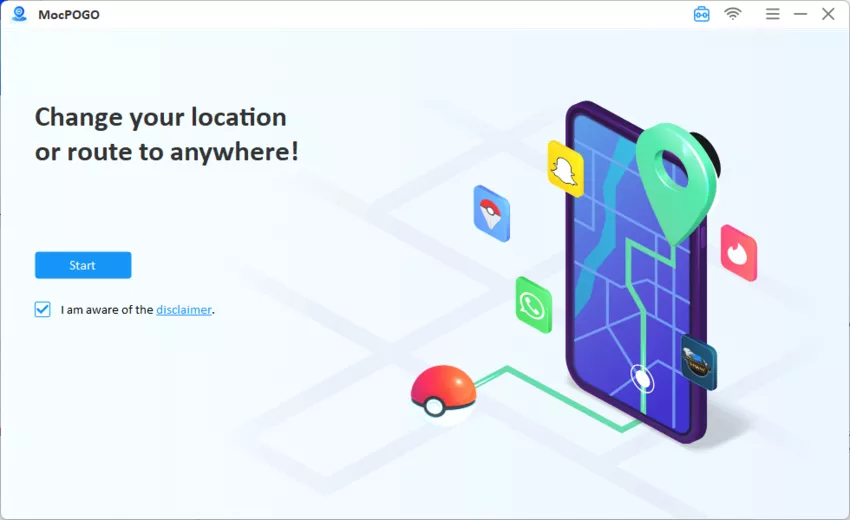
Step 1 Download MocPOGO on your computer and then click the Start button.
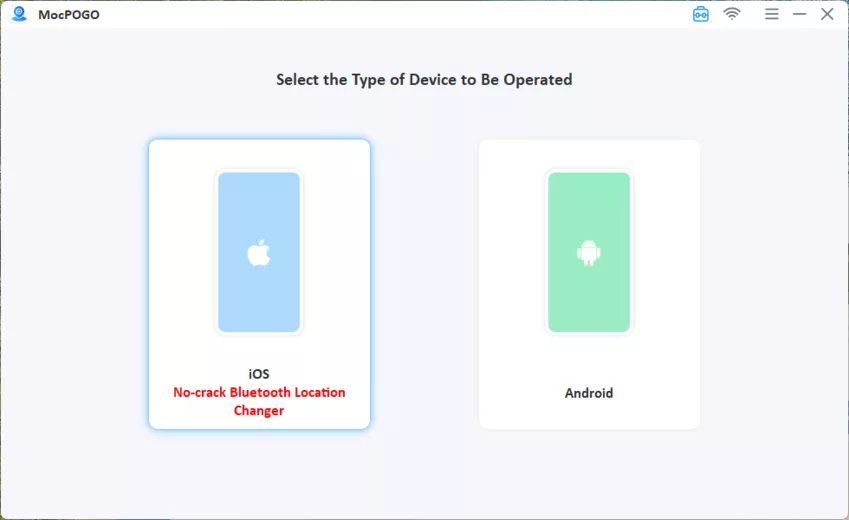
Step 2 Connect your device via USB and choose the operating system of your connected device.
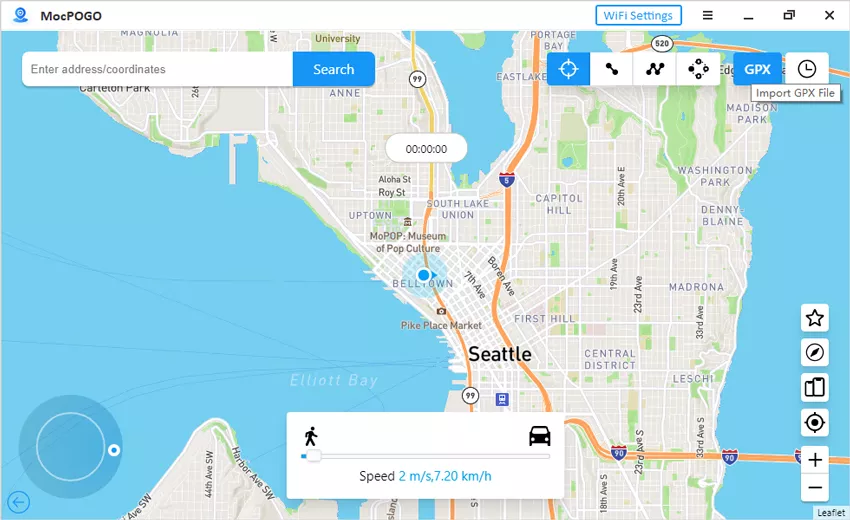
Step 3 Click the GPX button at the top right of the interface. Browse to the GPX file you want to import and then click Open to load it. Set the loop time if you want to repeat the Route, along with the travel speed to move forward. You can even stop the movement in between
Part 5. A Route to New Friendships Special Research
A Route to New Friendships is a Special Research story in Pokémon GO, introduced during the Along the Routes event in December 2023. This research centers around Mateo, an NPC who occasionally appears at the end of Routes and allows you to exchange Gifts.

Once you have started A Route to New Friendships in Pokémon GO, there is no time limit to complete it, so you can finish it at your own pace.
Note: This Special Research was only available to players who logged in during the event period (December 5–8, 2023). If you didn’t claim A Route to New Friendships Pokémon GO back then, it is no longer obtainable.
The research consists of 4 steps, with tasks involving exploring, spinning PokéStops, catching Pokémon, and exchanging Gifts with Mateo. Rewards include encounters with Pokémon like Lillipup, Wooloo, Woobat, Feebas, and Hisuian Sneasel, along with XP and Stardust.
💡Tip: Mateo does not appear at the end of every Route, only occasionally. If you’re working on A Route to New Friendships in Pokémon GO and need to exchange Gifts with him, be patient and complete Routes regularly until he shows up.
Part 6. FAQs about Pokémon GO Routes
Now that you’ve learned what Routes are, how to create them, follow them, and even import GPX files from anywhere in the world, you might still have some specific questions. Below are answers to the most common questions Trainers have about Pokémon GO Routes.
Q1: Can I make changes after I submit my Route?
No, once you submit your Route, it cannot be changed, edited, or deleted.
Q2: Why are there no routes in Pokémon GO?
The routes will be available once you reach Level 5. If you log in with a child account, check settings in the Parental Control Portal.
Q3: Where is the nearby menu in Pokémon GO?
On the bottom-right corner of the map, there is a white icon representing the Nearby Menu in the Pokémon GO app.
Q4: How long does it take for my Route to appear on the map?
Approval time varies. Niantic aims for a 24-hour review, but has also mentioned that it may take a week or more in some cases. Player feedback shows wide differences: some routes get approved in minutes, while others take months.
Final Words
Pokémon GO is an intuitive and user-friendly game application. It connects the real world with the virtual world with its latest feature: Pokémon GO Routes. This allows the users to follow a certain pre-defined path to earn rewards and interact with others. With Pokémon GO Routes, you can follow, create, and complete a route according to your preference.
If you don’t want the hassle of traveling, you can play this game with MocPOGO at your place without moving. Although Pokémon GO does not allow location spoofing, you can do so with MocPOGO by entering location coordinates. Pokémon GO Routes allow you to enter a virtual world while staying in the real world.