


HWID Spoofer Risks and Safer Alternatives for Gamers

Getting hardware banned feels like losing your entire gaming identity. You’re facing a permanent ban on a brand-new account, wondering if you’ll ever play again. Hardware ID (HWID) spoofers promise a way to return, but are they actually safe?
Whether you’re trying to get back into competitive games like Valorant, Fortnite, Rust, Call of Duty, or Apex Legends, or just exploring location-based games like Pokémon GO from home, the risks are real — and often misunderstood.

Part 1. What is an HWID Spoofer?
An HWID spoofer is software that changes your computer’s hardware identifiers to bypass permanent hardware bans. When anti-cheat systems ban you, they create a digital fingerprint from your PC’s components: motherboard serial, disk drive ID, MAC address, BIOS data, and GPU identifiers. That fingerprint goes on a blacklist. A new account created on that computer gets banned immediately.
A spoofer tricks the system by feeding it fake hardware IDs. The anti-cheat sees different serial numbers and thinks you’re on a completely new machine.
Part 2. How Does an HWID Spoofer Work?
Most HWID spoofer tools operate by loading unsigned drivers into Windows before your game launches. These drivers sit between the operating system and your hardware, intercepting requests from anti-cheat systems like EasyAntiCheat (EAC) or BattlEye. This happens at the kernel level, meaning the spoofer loads before the anti-cheat driver and intercepts hardware queries before they reach the real components.
When the game asks for your motherboard UUID, the spoofer intercepts that query and returns a fabricated serial number. The same process applies to disk drives, network cards, and SMBIOS data. The anti-cheat gets clean, unrecognized IDs and grants access. Some HWID spoofer versions work temporarily, reverting to real IDs after a restart. Others make permanent changes that survive reboots.
The entire process is technically complex because you’re modifying core Windows functions. This explains why free HWID spoofers from sketchy forums often come bundled with malware or other harmful software. Moreover, many spoofers lack proper updates and security, making them risky to use.
Part 3. Risks of Using an HWID Spoofer
Hardware ID manipulation isn’t a clean fix. The process introduces multiple failure points that can damage your system or make your situation significantly worse.
1. System instability
Kernel-level drivers can conflict with legitimate system components. Users report random blue screens, boot loops, and hardware detection failures after installing spoofers. Windows Update patches sometimes trigger these crashes because the spoofer driver becomes incompatible with new security features. One bad interaction and you’re looking at a fresh OS install.
2. Malware risk
Downloading free HWID spoofers from Discord servers or anonymous forums is gambling with your data. Many contain keyloggers, ransomware, or cryptominers disguised as spoofing tools. These programs request administrator privileges, granting malware full system access. Security forums documented multiple cases where free HWID spoofer options delivered malware instead of actually bypassing bans. Any HWID spoofer from an untrusted source puts your entire system at risk.
3. Detection by anti-cheat
Anti-cheat systems evolve monthly. What worked in January gets detected by March. When a HWID spoofer method for Fortnite gets flagged, everyone using it faces ban waves. Developers race to update their tools, but detection often happens before patches arrive. Even well-known HWID spoofers occasionally get caught during anti-cheat updates.
4. Terms of service violations
Using any spoofer violates game publisher agreements. Getting caught means permanent account suspension plus hardware ban reinforcement. Some publishers add your payment methods and linked accounts to blocklists. If you’ve invested money in skins or battle passes, those purchases vanish.
Part 4. Safer Alternatives to HWID Spoofing
Hardware bans feel permanent, but several legitimate paths exist that don’t involve kernel drivers or malware risks.
1. Replace hardware
Swapping your hard drive or SSD often resolves HWID bans. Most games track disk serials as primary identifiers. A replacement drive for around $60 plus a fresh Windows installation gives you genuinely new hardware IDs without spoofing software. For comprehensive bans, add a new motherboard. It’s an expense, but it’s permanent and carries zero detection risk.
2. Reinstall the operating system
This doesn’t work alone. Fresh Windows keeps your hardware serials intact. However, combining a clean install with hardware replacement eliminates leftover traces like registry entries, cached IDs, and residual game files that anti-cheat systems scan for.
3. Wait it out
Some hardware bans expire after 6 to 12 months. Publishers occasionally reset ban databases during major anti-cheat overhauls. Waiting costs nothing and guarantees you won’t make your situation worse with failed spoofing attempts. Check publisher forums for reports of ban lifts before investing in other solutions.
4. Play different games
If you’re permanently banned from your favorite PC shooter, you can always switch to a different title in the same genre. This sidesteps the hardware ban entirely and removes the temptation to risk your system with HWID spoofer tools. You keep your current PC setup with zero modifications, and you avoid the detection risks that come with kernel-level anti-cheat systems like Riot Vanguard or Easy Anti-Cheat.
5. The best alternative for Pokémon Go spoofing: MocPOGO
As a Pokémon Go player, you face a completely different situation. You don’t need to spoof hardware IDs to change your GPS location. MocPOGO is a cross-platform GPS changer that runs on Windows PC, Mac, iOS and Android. MocPOGO works by modifying GPS data at the system level without touching the Pokémon Go app itself. This approach is safer than modified versions of the Pokémon Go app, which Niantic’s anti-cheat system easily flags.
Key features of MocPOGO:
- Teleport Mode: This feature lets you jump to any global location with one click. Hunt regional Pokémon in Tokyo, then switch to London raids without leaving your room. The interface uses a map where you search for cities or paste GPS coordinates.
- GPS Joystick: Take full control of your movement in real time. Move your character freely while simulating natural walking behavior to stay under the radar. With adjustable speed settings, you can easily switch between walking, cycling, and driving modes.
- Go Catcher: Take your Pokémon GO gameplay to the next level with hands-free automation. It automatically catches wild Pokémon and spins PokéStops as you move, just like a virtual Pokémon GO Plus+ — no extra hardware needed.
- Custom Routes and Speed: Use two-spot or multi-spot route planning to move naturally. Set waypoints and walking speeds (5-9 km/h) to hatch eggs and earn buddy candy naturally. The system follows your custom path automatically while you handle other tasks.
- Cooldown Timer: This displays safe waiting periods between location jumps. Teleporting from New York to Sydney requires a 2-hour cooldown before catching Pokémon or spinning PokéStops. MocPOGO tracks this automatically, preventing soft bans caused by impossible travel speeds.
- Multi-device Support up to 15: Control all devices simultaneously— perfect for families or dedicated trainers running coordinated raids.

168,282 people have downloaded it.
- Change GPS location on iOS device without jailbreak.
- Streamline raids, battles and catches with POGO Assistant for iOS.
- Support Pokémon GO, Monster Hunter Now, Life360, Tinder, etc.
- Find any Pokémon or raid instantly with Resource Search.
- Support the latest iOS 26/Android 16.
How to use MocPOGO for Pokémon Go:
Step 1 Download the latest version of MocPOGO and install it on your Windows PC or Mac. Open the tool and click on the Start button.

Step 2 Connect your device and then select iOS or Android.
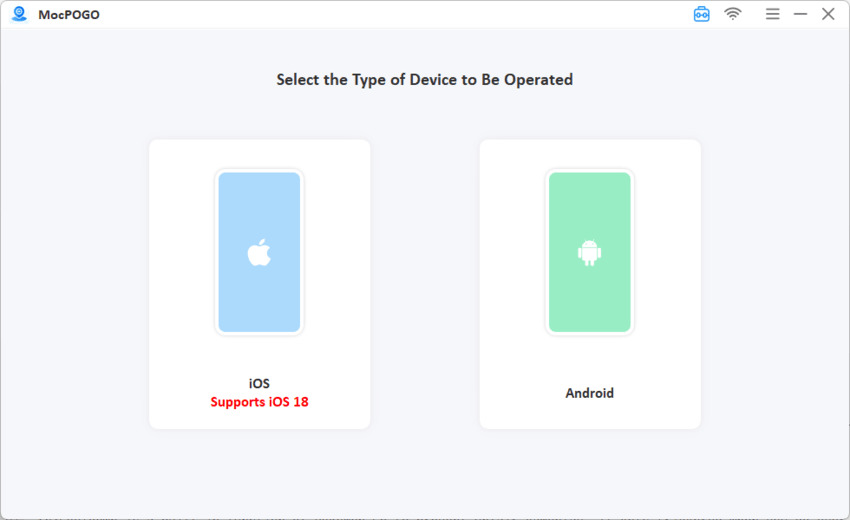
Step 3 Select your preferred mode: Teleport Mode for instant location changes or Multi-Spot Mode for automated route walking. Enter your destination by searching city names, addresses, or GPS coordinates in the search bar.
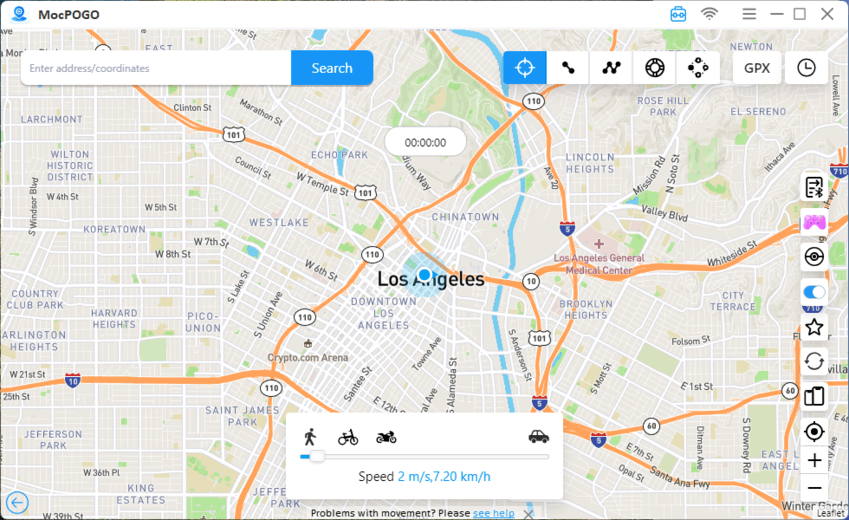
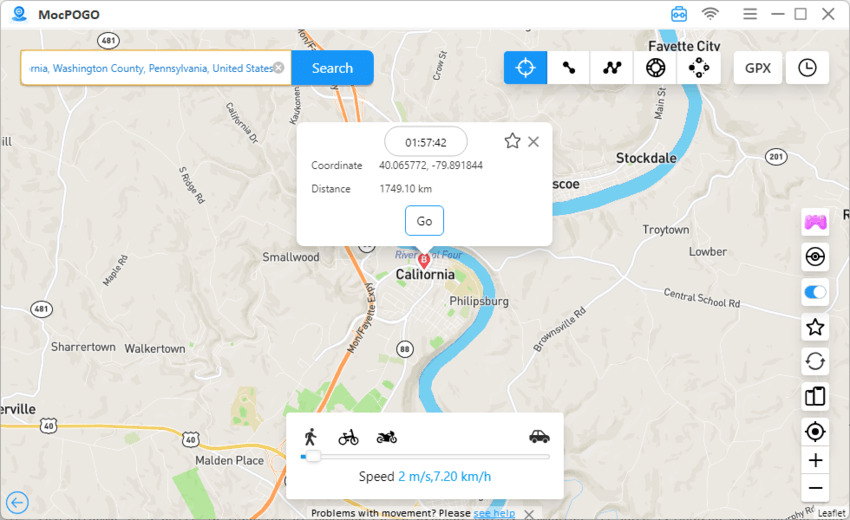
Step 4 Tap the Go button to change your location. Open Pokémon Go, and your character appears at the new coordinates. Use the joystick to explore, or set up a walking route to collect items and hatch eggs while maintaining realistic movement patterns that avoid detection flags.
Play Smarter, Not Riskier
Hardware bans hurt, especially when you’ve invested time and money into your favorite games. But HWID spoofer tools for PC gaming carry serious risks: system crashes, malware infections, detection bans, and terms of service violations that can worsen permanent bans.
For Pokémon Go specifically, those risks are unnecessary. You don’t need kernel drivers or hardware ID manipulation to catch regional Pokémon or join overseas raids. MocPOGO provides a stable, safer GPS spoofing method that works on stock devices without jailbreaking or risking your account through modified game clients.
Download MocPOGO today and explore Pokémon Go the smart way. Free trial available.


