


Easy Tutorial: How to Change Location on WhatsApp

You want to share a location on WhatsApp, just not your actual one. Maybe it is for privacy, a prank, or keeping a surprise intact. Whatever the reason, WhatsApp does not make this easy by design.
There are three ways to change location on WhatsApp in 2026.

Part 1: Why Change Your WhatsApp Location?
Not everyone who searches for how to change their live location on WhatsApp or fake live location on WhatsApp is up to something. A significant number of users are concerned that their exact home address could be exposed. Others are in long-distance relationships where a partner checks live location more often than they feel comfortable. Some are parents who want to stay connected with family without revealing their precise coordinates to everyone in a group chat.
WhatsApp is used by over 2 billion people globally, and the live location feature, while useful, creates real discomfort for many of them. The ability to change WhatsApp location from a specific address to a general area is still genuine, just less precise — it is a reasonable privacy preference, not a red flag.
Part 2: Can You Change Your Location on WhatsApp?
No. WhatsApp has no built-in option to fake your location — it reads your phone’s GPS directly.
WhatsApp supports two location types: static pins and live locations. A static pin is just a map point you select manually; no spoofing needed. Live location shares your real-time GPS position for 15 minutes to 8 hours. To fake it, you must change what your phone’s GPS reports system-wide.
Common reasons include privacy concerns, keeping event locations secret, or testing geolocation features.
Part 3: 3 Useful Ways to Change Location on WhatsApp
Changing your WhatsApp location depends on whether you need a one-time static pin or ongoing live location sharing. Here are three methods, ranked from simplest to most advanced.
Method 1: Select a Pin on the Map (No App Needed)
Tap the attachment icon in WhatsApp, choose “Location,” and search for any address. Share that pin. The recipient sees a static map point and can get directions.

The limitation: This only works for static locations. It cannot fake live location tracking. If someone expects moving coordinates, a static pin is immediately obvious. Use this for quick meetups or sharing business addresses — not for ongoing location sharing.
Method 2: Use a Fake GPS App (Android and iOS)
Free fake GPS apps set a mock location that WhatsApp reads when you share your location. On Android, this works through Developer Options by enabling mock location and setting the app as your location provider.
The reality: Free apps work inconsistently. WhatsApp and Google have tightened location permissions since 2024, requiring “Precise” and “Always Allow” access. Many free tools fail silently — you think your location changed, but WhatsApp still reads your real coordinates.
On iPhone, free fake GPS apps don’t work without jailbreaking. Apple’s sandboxing prevents third-party apps from overriding GPS at the system level unless they use a desktop connection method.
The better Android and iOS option: MocPOGO
MocPOGOis a cross-platform GPS spoofer available on Windows, Mac, iPhone, and Android. It changes your device’s system GPS, so WhatsApp reads the virtual location as real.

168,282 people have downloaded it.
- Change GPS location on iOS device without jailbreak.
- Simulate GPS movement with custom speeds.
- Change the location of all location-based games/apps.
- Support GPS joystick to play AR game on PC.
- Multi-Device control up to 15 devices.
- Support the latest iOS 26/Android 16.
Key Features of MocPOGO
What makes MocPOGO worth using over free alternatives comes down to a few specific features.
1. Works on both Android and iPhone devices without rooting or jailbreaking: iPhone users can change WhatsApp location without touching security settings — something free apps cannot deliver. Bluetooth mode allows wireless GPS changes after initial setup.
2. Customized speed and route simulation for live location: Set a path and walking speed (e.g., 5 km/h), and your GPS moves naturally along that route as WhatsApp broadcasts it. This creates believable movement instead of frozen pins or impossible jumps.
3. Historical location records and one-click reuse: Saves locations and routes for repeat use. Supports up to 15 devices simultaneously and works with iOS 26 and Android 16.
4. Multi-app and game compatibility: Supports social apps (WhatsApp, Snapchat, Instagram, Tinder, Life360) and games like Pokémon GO — all from one tool with a dedicated Social Mode for non-gaming apps.
How to Change WhatsApp Location using MocPOGO:
Step 1 Download MocPOGO on your iPhone or Android.
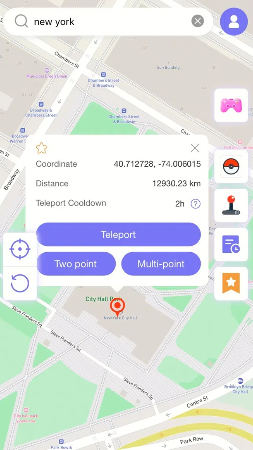
Step 2 Enter the target address or coordinates in the search box to change your iPhone GPS location.
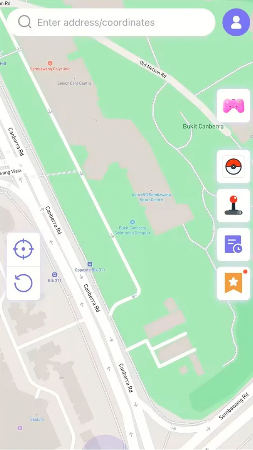
Step 3 Now, select the location and hit “Teleport” on and map.
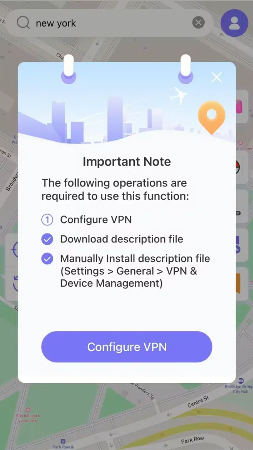
Step 4 MocPOGO for iOS will ask you to configure VPN, click on “Configure VPN” to go on.
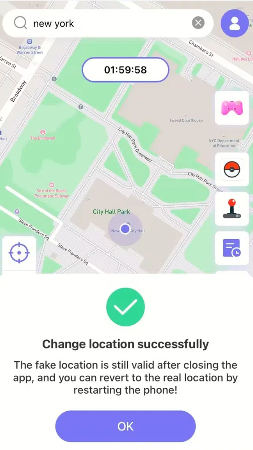
Step 5 Your location will be changed to there. Open WhatsApp and share your location or start a live location share. WhatsApp will read the spoofed GPS coordinates.
For live location shares that need to look like real movement, use MocPOGO’s route simulation: place multiple pins to create a path, set a realistic walking speed, and start the simulation before sharing live location on WhatsApp.
Method 3: Jailbreak or Root Your Phone
Jailbreaking (iPhone) or rooting (Android) grants system-level access, enabling location spoofing apps to operate at full power.
The downsides: Both void your warranty and expose your device to security vulnerabilities. Banking apps and many social apps detect jailbroken/rooted devices and refuse to run. The technical process varies by device and OS version — what worked six months ago may require different tools after an update.
For users already running jailbroken devices who understand the tradeoffs, it works. For everyone else, MocPOGO delivers the same result without the risks.
The Practical Answer for 2026
For static addresses, use the map pin method inside WhatsApp. For live location changes on iPhone or Android without system modifications, Whatsapp Location Changer is the only clean solution that works in seconds.
If you need realistic movement for a fake live location on WhatsApp, MocPOGO handles it properly. Free fake GPS apps are unreliable on both platforms, and jailbreaking carries unnecessary device-level risks.
MocPOGO offers a free trial at mocpogo.com to test the teleport feature and check compatibility before committing.


