


Best Fake GPS App for Snapchat – Top Picks for iOS & Android

Snapchat’s Snap Map feature lets your friends see your real-time location, which can be useful, but it’s not always what you want. You may look for ways to fake Snapchat location to protect your privacy, explore filters from different regions, or simply have more control over what you share.
In this guide, we’ve tested and reviewed the best tools to help you fake GPS location for Snapchat easily and securely.

Part 1: Can You Fake Your Location on Snapchat?
Snapchat has several location-based features that rely on your device’s GPS data. Understanding how they work helps explain whether you can fake your location on Snapchat.
How Snapchat Tracks Your Location
Snap Map Activity: Once you turn it on, your Bitmoji shows up on the map and moves to wherever you are whenever you have the app open.
Background Location: Even when you’re not actively using Snapchat, the app may still access your location (if permissions are set to “Always”), allowing it to keep your last known position updated.
Footstep Feature: Snapchat can track how far you’ve traveled and display it as “footsteps” on the map, giving insights into your movement over time.
Place Visits: The app may log and display places you’ve visited, such as restaurants or landmarks, based on your location history.
IP Addresses: In addition to GPS, Snapchat may use your IP address to approximate your location, especially when GPS data is limited.
Because all of these features depend on GPS, Snapchat continuously reads your device’s location data to keep everything accurate.
So, you can fake your location on Snapchat, but not through Snapchat’s built-in settings. Snapchat does not provide any native option to manually change your location. You also can’t fake your location by simply:
- Turning off location services
- Switching networks or using a VPN
- Changing app settings
These methods either disable location completely or fail to affect GPS data.
Part 2: Top 3 Fake GPS Apps for Snapchat (Android & iOS)
If you want to fake GPS location for Snapchat, choosing the right tool is essential. Below are the top tested apps that actually work on Snap Map and location-based features.
Top 1. MocPOGO – 4-in-1 Fake GPS App (Android, iOS, Win & Mac)
MocPOGO is one of the most advanced and reliable tools to fake Snapchat location across multiple platforms, including iPhone, Android, Windows, and Mac. Unlike basic spoofing apps, it doesn’t just drop a fake pin—it fully overrides your device’s GPS data, ensuring Snapchat reads your virtual location as real.
What makes MocPOGO stand out is its combination of accuracy, stability, and stealth. Snapchat relies heavily on real-time GPS signals for features like Snap Map and geo-filters, and many free tools fail because they create inconsistent or easily detectable location data. MocPOGO solves this by providing precise GPS spoofing with realistic movement simulation, making your location changes appear natural and continuous.
Another key benefit is its ease of use. You don’t need to jailbreak your iPhone or root your Android device, which keeps your device secure and avoids technical complications. The interface is beginner-friendly, allowing you to change your location with just a few clicks.

168,282 people have downloaded it.
- Change GPS location on iOS device without jailbreak.
- Simulate GPS movement with custom speeds.
- Change the location of all location-based games/apps.
- Support GPS joystick to play AR game on PC.
- Multi-Device control up to 15 devices.
- Support the latest iOS 26/Android 16.
In short, MocPOGO isn’t just a basic fake GPS app for Snapchat—it’s a complete location control tool designed for reliability, privacy, and seamless performance.
Core Advantages:
- One-click location change to anywhere in the world
- No jailbreak or root required for iOS or Android
- Realistic movement simulation – walk, drive, or use custom routes
- Works smoothly with Snapchat Snap Map and all filters
- Advanced anti-detection – prevents location snapping and flags
- Multi-device support – spoof location on up to 15 devices at once
- Save favorite locations – bookmark spots for instant reuse
How to Fake Location on Snapchat without Getting Detected
Step 1 Download MocPOGO on your iPhone or Android.
Step 2 Search for any city or location, and choose your desired spot.
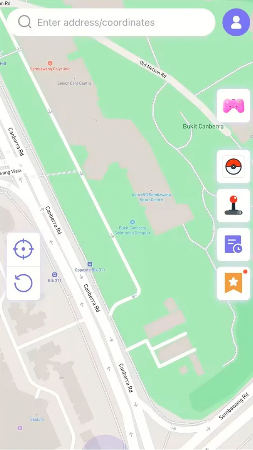
Step 3 Now, hit “Teleport” on and map.
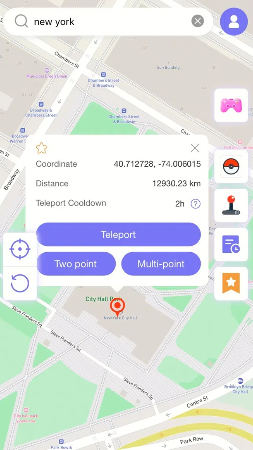
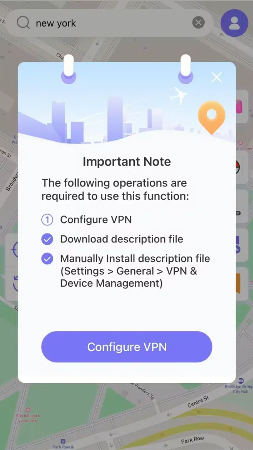
Step 4 MocPOGO for iOS will ask you to configure VPN, click on “Configure VPN” to go on.
Step 5 Your location will be changed to there successfully.
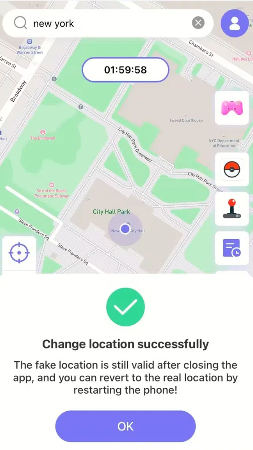
Now, open Snapchat to see your new location on Snap Map.

Top 2. Fake GPS Location Lexa (Android Only)
Fake GPS Location by Lexa is one of the most widely used tools for Android users who want a free fake GPS app for Snapchat. It allows you to manually set a custom location on the map, making your device appear as if it’s somewhere else. With its simple interface and lightweight design, beginners can quickly drop a pin anywhere in the world and start spoofing without needing a computer—making it a convenient option for basic use like accessing geo-filters or testing different regions.

However, since it relies on Android’s mock location settings, it lacks advanced features like movement simulation and anti-detection optimization. As a result, while it works for simple location changes, it can be less stable and more likely to be detected by apps like Snapchat that closely monitor location behavior.

- Free and easy to use.
- Lightweight app with simple interface.
- Works without a computer.

- Requires enabling developer options.
- No advanced movement simulation.
- Higher risk of detection on apps.
- Limited stability compared to premium tools.
Top 3. Fake GPS Go Location Spoofer (Android Only)
It is another widely used option for Android users who want to fake location on Snapchat with minimal setup. The app provides a straightforward way to manually select and apply a custom GPS location, making it easy for beginners to get started without technical knowledge.

Unlike more advanced tools, it focuses on simplicity—allowing you to quickly drop a pin on the map and change your location in seconds. This makes it useful for basic tasks like testing locations or accessing region-based features. However, due to its limited functionality and lack of advanced spoofing technology, it may not offer the same level of stability or reliability when used with apps like Snapchat.
- Simple setup process.
- Allows manual location selection.
- Free version available.
- Less accurate GPS spoofing.
- Can be detected by some apps.
- No route or joystick simulation.
- May cause location glitches.
Quick Takeaway
While free apps may work for basic needs, they often lack reliability and safety. If you want a stable and secure way to fake location on Snapchat, MocPOGO remains the best all-in-one solution.
Conclusion
Faking your location on Snapchat is possible, but not all methods are reliable. Native settings won’t work, and many free apps come with limitations like instability, detection risks, or lack of advanced features.
If you’re looking for the best fake GPS app for Snapchat, a dedicated tool is essential. Among all the options, the best fake GPS app for Snapchat stands out as the most reliable solution. It lets you fake Snapchat location with precision, simulate real movement, and avoid detection—all without jailbreak or root.
If you want a safe and effective way to fake your GPS location on Snapchat, MocPOGO is the best choice to control your virtual location and enjoy full flexibility on Snap Map.


