


The 100% Reliable Pokemon Go Spoofer No Verification Today

You’ve come across what looks like an ideal Pokémon Go spoofer with no verification. You download it, open it, and suddenly: “Enter your phone number to get started or create an account to continue”. Instant frustration.
The majority of trainers want to teleport to a different location, find a rare Pokémon, and get back to playing without handing over personal details. You shouldn’t be required to authenticate yourself just to get a region-locked Pokémon, join a raid, or even scout out new Pokéstops.
So, what’s the real deal with verification? Let’s cut through the confusion.

Part 1: Why is a Pokémon Go Spoofer Asking For Verification?
Have you ever wondered why a verification prompt shows up when you try to use a Pokemon Go spoofer? You’re not alone. Below are the reasons why these platforms ask for your phone number or email:
1. Preventing Bot Abuse
Automated scripts and bots target spoofing services to farm accounts on a large scale. Phone verification is one of the fastest ways to slow them down but it also annoys legitimate players.

2. Login Loops / Account Recovery
Certain modified apps have their own account to handle licensing or unlocking of features. This provides an extra login step that can be annoying and leaves a record you might not want.
3. Safety Screening That Secretly Collects Your Data
Not all spoofing tools are created equal. Some malicious tools pretend to verify your identity but actually steal and sell your personal data. This is why you should be wary of any tool that asks for your phone number or email before you can even use it.
The good news is that the best no verification Pokémon Go spoofer – MocPOGO does not require any of this. You can spoof your location securely and anonymously, and we’ll show you how below.
Part 2: How to Spoof Pokemon Go Without Verification
Players typically use three main methods to spoof Pokemon Go without verification. Each method works differently, but not all carry the same level of risk. The third option, MocPOGO, is the safest. They are compared in the table below:
| Features | GPS Location Changer (MocPOGO) | Modified App (PGSharp) | Android Developer Options |
|---|---|---|---|
| Verification Required? | None | Account required | None |
| Account Ban Risk | Low (built-in safety tools) | Medium | High |
| Setup Difficulty | Easy | Moderate | Advanced |
| Works on iOS? | Yes, works on Mac, Windows, iOS and Android | Android Only | Android Only |
| Joystick/Route Simulation | Yes | Yes | Limited |
| Multi-device Support | Up to 15 devices simultaneously | Single device | Single device |
| Cooldown Timer | Built-in | Manual | No |
As you can see, no-verification GPS location changers like MocPOGO give you the best combination of safety and convenience, requiring no account or phone number.
The Best No-Verification Spoofer – MocPOGO
MocPOGO is a powerful cross-platform GPS location changer designed for mobile games like Pokémon Go. It works on Windows, Mac, iOS, and Android, giving you the flexibility to change your device’s location whether you’re on a computer or directly on your phone.
Critically, it requires no account creation, no phone number, and no rooting or jailbreaking. You open the app, connect your device, and start spoofing. That’s it. No sign-up wall, no SMS verification, no personal data collected ever. This is exactly what separates MocPOGO from the crowd. Many so-called “free” spoofers use verification prompts as a gateway to harvest your contact details. MocPOGO skips all of that. It’s the most trusted no‑verification GPS changer in the Pokemon Go community, and the features back that reputation up.

168,282 people have downloaded it.
- No phone number or account required – start spoofing instantly.
- Plan custom routes with multiple waypoints.
- Change the location of all location-based games/apps.
- Support GPS joystick to play AR game on PC.
- Save most-used coordinates or GPX routes without searching again.
- Import GPX routes to simulate natural walking paths.
Key Features
- Auto Catch: MocPOGO Go Catcher feature automatically catches nearby Pokémon without tapping.
- One-click teleport: Instantly move your GPS to any location on the map.
- Simulate Realistic Movement: Select custom walking, biking, or driving paths with variable speed to avoid detection.
- Built-in Cooldown Timer: The timer will tell you the precise time to wait after teleporting before you can interact with a Pokémon or gym, helping keep your account safe.
- Pokemon & Raid search: Find specific Pokémon spawns and active raids anywhere in the world.
- Multi-Device Support: Manage GPS location on up to 15 devices simultaneously — ideal for dedicated players or teams.
- POGO Assistant for iOS: IV Preview, Quick Catch, Enhanced Throw, Auto Raid, and Quick Raid – all in one assistant to streamline your Pokémon GO gameplay.
Why MocPOGO is the top pick: Unlike modified APKs that demand an account login, or sketchy tools that ask for your phone number “for safety”, MocPOGO collects zero personal data, requires no account, and bakes account-protection features (like the cooldown timer) into every step. It’s the only pokemon Go spoofer no verification solution that’s genuinely safe from start to finish.
How to use MocPOGO to change Location in Pokémon Go
Step 1 Download MocPOGO on your Android or iPhone.
Step 2 Enter the target address or coordinates in the search box.
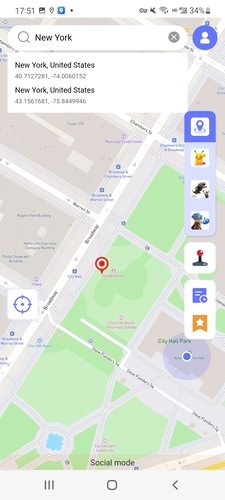
Step 3 Choose your spoofing mode. Teleport mode instantly moves you to any location, while two-spot and multi-spot modes simulate movement along a set route.
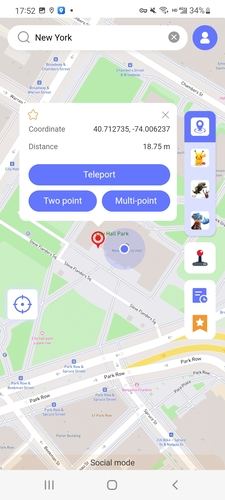
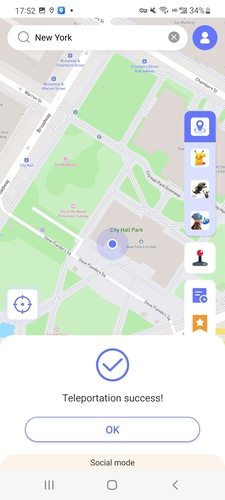
Step 4 Within seconds, your Pokémon Go GPS will be changed to that location.
Method 2. Modified App (like PGsharp)
Some modified apps also let you spoof Pokémon Go without verification. PGSharp is a popular example for Android devices. It replaces the official app entirely and includes built-in spoofing features like a joystick, teleport, and auto-walk. However, it comes with notable trade-offs.

Pros
- Built-in joystick and teleport features
- No root required
- Works on standard Android devices
Cons
- Very high ban risk – Niantic actively scans for modified clients
- No movement simulation or cooldown timer built-in
- Android only – no iOS version
- Requires disabling Google Play Protect and enabling “Unknown Sources”
- Game updates often break the mod; you must wait for a new PGSharp release
Method 3: Android Developer Options (Mock Location)
Android has built-in Developer Options, including a “Select mock location app” setting, which can be used to spoof your GPS location through a third-party app. This is a basic method and is not advisable for playing Pokémon Go.

Pros
- No third-party spoofing software required
- Free and embedded in Android
- No account required
Cons
- Very high ban risk – Niantic can detect mock location flags easily.
- No movement simulation or cooldown tool
- Android only
- Needs to enable Developer Mode (not intuitive to beginners)
- No route planning or joystick control
Part 3: FAQs about Pokémon Go Spoofing
Let’s address the most common concerns trainers have about spoofing safely.
Q1: Can you safely use a Pokémon Go Spoofer without Verification?
It depends entirely on the tool you use. Tools that do not need verification (in particular, desktop-based GPS changers, such as MocPOGO) are generally safer because they don’t store your personal information. The key is to follow in-game safety rules: follow cooldwon timer, avoid teleporting too often, and use natural movement simulation. Apps that require phone verification are usually more harmful to your privacy than your game account.
Q2: Does Niantic know when I use a spoofer?
Yes, Niantic has mechanisms to combat unnatural movement patterns, such as appearing across the globe in a second or interacting with Gyms after a long jump. This is the reason why it is important to utilize a tool that has a built‑in cooldown timer and realistic movement simulation. Following proper cooldown rules can significantly lower your risk of being detected.
Q3: What is a cooldown, and why is it important?
The cooldown is a required waiting time when you teleport to a new place before you can catch Pokémon, spin PokéStops, or battle in Gyms. Niantic tracks your movement between spots. If your in-game actions imply that you teleported (e.g., you caught a Pokémon in Tokyo 5 minutes after catching one in New York), Niantic can flag or soft-ban your account. The built‑in cooldown timer in MocPOGO will calculate the precise waiting time based on distance, so you do not have to guess.
Q4: To spoof my phone, must I jailbreak or root my phone?
No, you don’t need to. Jailbreaking or rooting your phone dramatically raises the risk of being banned and voids the warranty of your phone. MocPOGO does not require jailbreak or root; it works by modifying the GPS data sent to your phone from your computer. It is the safest and cleanest method available.
Q5: What can I do not to get banned when spoofing?
These are the basic rules: never teleport immediately after cooldown is over; never teleport more than once or twice in a session; mimic natural movement speeds (walking 5‑10 km/h instead of instant jumps); avoid spoofing during Niantic events when it is more likely to be monitored; and use trusted, low‑detection tools such as MocPOGO instead of risky altered APKs.
Conclusion
Finding a trusted Pokémon Go spoofer that requires no verification doesn’t have to be complex or dangerous. Most apps that require phone validation are either incompetently made or simply gathering your information for purposes unrelated to Pokémon Go. Avoid them.
Among the three approaches discussed in this guide, MocPOGO is the best choice for Pokemon Go players. It needs zero account registration, zero cell number, and zero rooting. Its inbuilt cooldown timer, joystick control, and realistic movement simulation make it a tool that truly safeguards your account and gives you total freedom to navigate the Pokémon map of the world.
MocPOGO remains the safest, most full‑featured no‑verification Pokémon Go spoofer in 2026. Download it, follow the instructions above, and get back to playing the way you like.


