


How to Spoof Bluetooth Location with Working Ways

You may have heard about Bluetooth-based GPS spoofing as an agile, wireless way to control your device location. But is it truly possible? What’s the best tool? And how can you avoid common pitfalls? Let’s find out.

Part 1. Can I Spoof Bluetooth Location?
Bluetooth location spoofing means changing your device’s GPS location using a Bluetooth connection instead of a USB cable. This is typically done using a Bluetooth-based spoofer — it allows your phone to receive fake GPS data from another device (like a computer) without any physical link.
Bluetooth GPS spoofing is widely used for:
- AR games like Pokémon GO (location‑based gameplay)
- Social apps such as Tinder and Snapchat (changing your visible location)
- Privacy protection (hiding your real whereabouts)
Is It Possible to Spoof Bluetooth Location?
Yes, it is possible — but only with tools that support wireless spoofing. Not all GPS spoofers offer this feature, and most apps on app stores usually don’t support Bluetooth‑based spoofing.
Bluetooth spoofing works by using a Bluetooth connection between devices to directly alter your GPS location at the system level. This allows you to change where apps think you are — without needing a USB cable or a computer nearby. It’s a more flexible and convenient way to spoof your location wirelessly.
Part 2: The Best Bluetooth Location Spoofer – MocPOGO
When it comes to choosing the best Bluetooth location spoofer, MocPOGO stands out as a powerful and reliable solution. It uses a simple Bluetooth connection to change your device’s GPS location without a USB cable, offering advanced control, stability, and cross-device compatibility. Whether you’re playing AR games, using social apps, or protecting your privacy, MocPOGO provides a smooth and safe experience. Its intuitive interface makes this powerful technique accessible even for beginners.

168,282 people have downloaded it.
- Change GPS location on iOS device without jailbreak.
- Go Catcher auto‑catch – automatically catches Pokémon and spins PokéStops without tapping.
- Works with the official Pokémon GO app.
- Support GPS joystick to play AR game on PC.
- Save favorite locations and custom routes.
- Support the latest iOS 26/Android 16.
Key Features of MocPOGO
Bluetooth mode – Spoof your GPS location via a Bluetooth connection between your iPhone and another device (Android phone or computer). Once paired, you can change your location wirelessly – perfect for quick, cable‑free spoofing.
No jailbreak or root required – Use the tool without modifying your device’s system, keeping your phone secure while enabling full GPS control.
One-click teleport – Instantly change your GPS location to anywhere in the world. It’s fast, simple, and ideal for beginners.
Joystick control – Move your location in real time using a virtual joystick. This allows precise control over direction and movement.
Realistic movement simulation – Simulate walking or driving along custom routes to make location changes look natural and believable.
Built-in cooldown timer – Automatically calculate safe movement intervals, reducing the risk by mimicking real-world travel timing.
Cross-platform & multi-device support – Work seamlessly on iOS, Android, Windows, and Mac while allowing you to control multiple devices up to 15 at the same time. This makes it ideal for users who need flexible location management across different platforms.
[Step-by-Step] How to Spoof Bluetooth Location with MocPOGO
MocPOGO offers two flexible ways to spoof Bluetooth location without relying on traditional USB‑based methods. You can either connect your iPhone to a computer via Bluetooth (Windows or Mac) for stable control, or use an Android device to spoof your iPhone’s location wirelessly — no computer needed. Both methods provide a convenient, cable‑free experience, making it easier to manage your virtual location anytime.
Method 1: Connect iPhone via Computer Bluetooth (Windows/Mac)
This method allows you to control your iPhone’s GPS location wirelessly through your computer using Bluetooth.
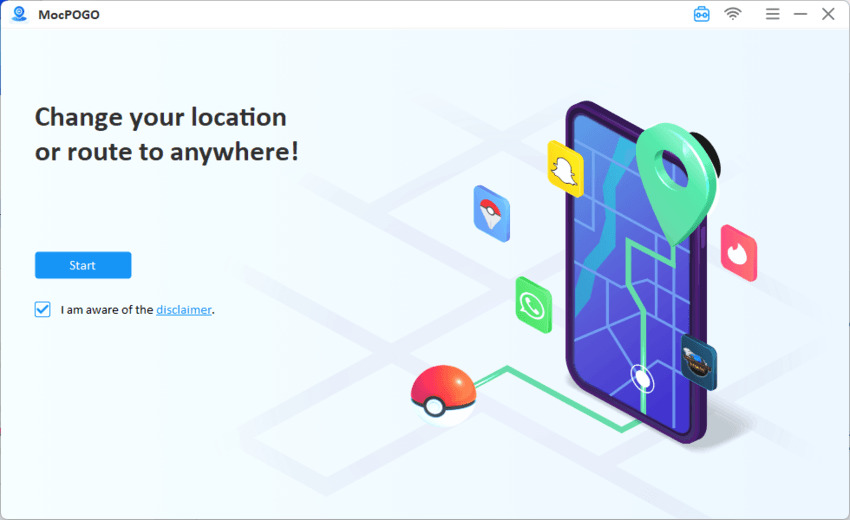
Step 1 Download the latest version of MocPOGO and install it on your computer. Launch it and click on the Start button.
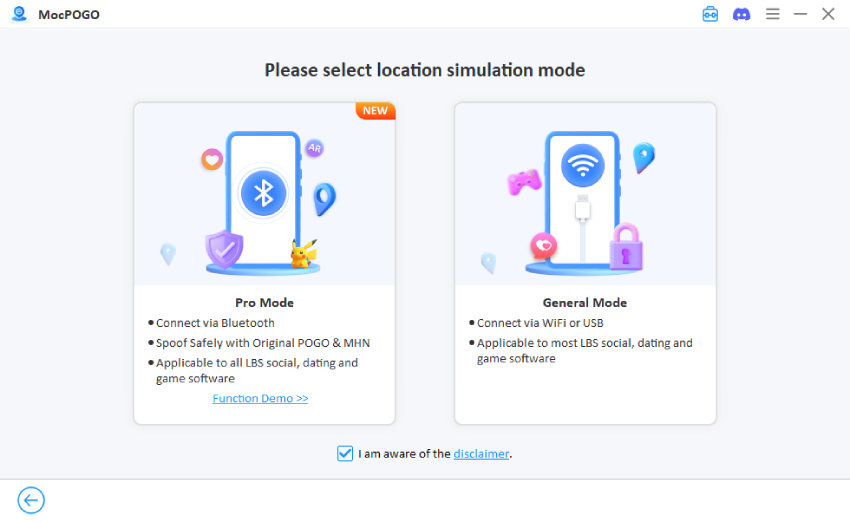
Step 2 Select Pro Mode which enables you to spoof location with Bluetooth without installing cracked Pokemon GO or MHN.
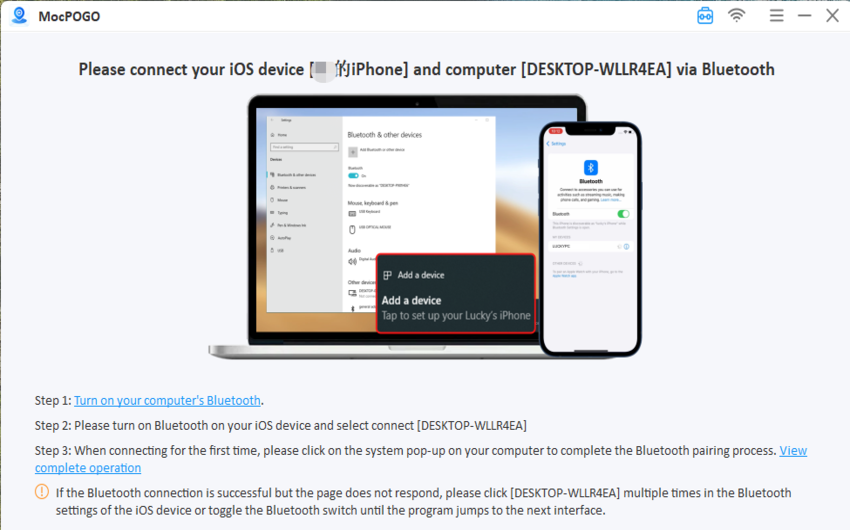
Step 3 Turn on Bluetooth on both your iPhone and computer and pair your iPhone with the computer via Bluetooth settings.
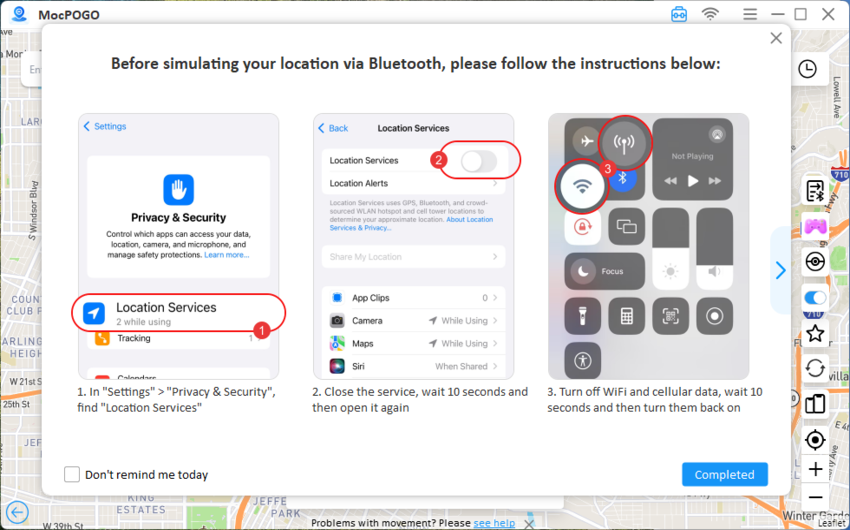
Step 4 Find “Location Services” under “Privacy and Security” via “Settings”. Close the service, wait for ten seconds before reopening. Then turn off Wi-Fi and cellular data, wait for 10 seconds, and then turn them back on.
Step 5 Choose teleport mode, search for a location and click “Go” to start spoofing your location. Then, open your target app (e.g., Snapchat or Pokémon GO) to confirm the new location.
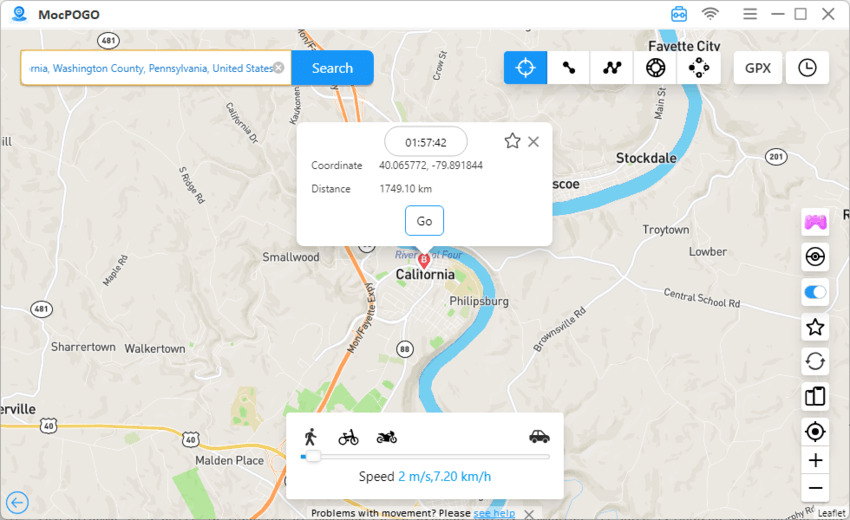
Method 2: Spoof iPhone Location via Android
MocPOGO for Android lets you spoof your iPhone’s location directly, and it works with all location-based AR/VR games and location-based applications.
Step 1 Download and install MocPOGO on your Android.

Step 2 Tap the “iOS option” at the top right to switch to iOS mode.

Step 3 Select Bluetooth Mode: In the MocPOGO interface, choose the Bluetooth Mode option to enable safe location spoofing for Pokemon Go.

Step 4 Pair via Bluetooth: After entering Bluetooth Mode, follow the on-screen instructions to pair your Android device with your iPhone directly.

Step 5 Set your location: Search for or tap a location on the map, then click Teleport. Then, iPhone’s GPS will update instantly.
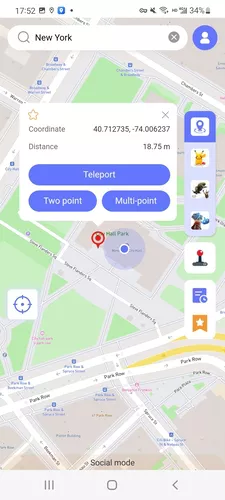
Part 3: Tips for Better Bluetooth Location Spoofing
To get the best results when you spoof Bluetooth location, it’s important to maintain stability and avoid suspicious behavior. Small mistakes can cause location glitches or even lead to detection, so following best practices ensures a smoother and safer experience.
1. General Tips For All Apps
- Keep your Bluetooth connection stable to prevent location jumping or signal drops. A weak connection can cause your fake location to reset or behave inconsistently.
- Use trusted tools like MocPOGO instead of random free apps. Unreliable tools often lack stability and may expose you to detection risks.
- If the location doesn’t update instantly, restart the target app. Some apps cache your last position, so refreshing helps apply the new GPS data properly.
Following these basics helps ensure your spoofed location appears smooth and believable.
2. Extra Tips For Pokémon GO Players
- Respect cooldown times after teleporting to avoid soft bans. Jumping long distances instantly without waiting can trigger restrictions.
- Simulate realistic movement by using walking speeds instead of sudden jumps. This makes your activity look natural within the game.
- Use MocPOGO’s built-in cooldown timer to automatically manage safe intervals between movements. This reduces risk and improves long-term stability.
These extra precautions are essential for maintaining a safe and consistent spoofing experience in AR games.
Conclusion
Bluetooth location spoofing offers a more adaptable and convenient way to control your GPS without being tied to cables. While not all tools support this feature reliably, choosing the right solution can significantly impact performance and safety.
Among all options, MocPOGO Bluetooth Location Spoofer shines as the top choice. It combines wireless connectivity, precise GPS control, and realistic movement simulation on one easy-to-use platform. Whether for apps, games, or privacy, MocPOGO provides a dependable and secure way to manage your location with confidence.


