


Hidden App for Locaiton Tracking: Top 6 You Should Know & How to Stop Tracking

Location tracking has become a standard feature in many apps, but not all location tracking apps are obvious or visible. Some run quietly in the background, making users wonder if there’s a hidden app for location tracking on their device.
This raises serious concerns: Can a person track your phone without you knowing? And more importantly, how can you detect and stop it?
In this guide, we’ll explore the most common hidden tracking apps, how to identify them, and the safest ways to stop unwanted tracking while protecting your privacy.

Part 1. What is the Best Hidden App for Location Tracking?
Before diving into specific tools, it’s important to understand what “hidden” tracking really means. Not all tracking apps are malicious, many are designed for safety, security, or device recovery. However, their ability to run quietly in the background is what often raises concern.
Hidden Location Tracking Apps
A hidden app for location tracking is any application that can monitor a device’s location in the background—often without being clearly visible or noticeable to the user. Unlike regular apps, these tools may run silently, disguise themselves, or operate with minimal interface, making them harder to detect.
These hidden tracking apps are commonly used for legitimate purposes like safety and device recovery, but they can also raise privacy concerns when used without consent.
Common Types of Hidden Tracking Apps
Not all phone tracking apps are designed the same. Here are the most common categories:
1. Parental Control App – Life360
But this convenience comes with limitations. Many users report common issues such as:
Apps like Life360 and FamiSafe are designed to help parents monitor their children’s location for safety. These apps often run continuously in the background and can track real-time movement.
2. Partner Monitoring App – mSpy & EyeZy
Tools such as mSpy and EyeZy are marketed for monitoring partners or family members. However, they are controversial because they can be used to track someone without their knowledge.
3. Device Recovery App – Find My
Apps like Find My are built to locate lost or stolen phones. Some hidden utilities (often labeled as “hidden apps”) may also serve this purpose by running discreetly in the background.
Part 2. Is There an App that Can Detect Hidden Trackers?
Many users ask: “Is there an app that can detect hidden trackers?” The truth is, while some security apps can help, there’s no single tool that guarantees detection of all hidden tracking apps.
Instead, the best approach is to manually check your device for signs of tracking. If you’re wondering “how to know if someone is tracking your phone” or “am I being tracked?”, here are the most effective methods:
1. Check Location Service Permissions
Go to your phone’s location settings and review which apps have access to your GPS.
- Look for unfamiliar or suspicious apps
- Check if any app has “Always Allow” permission unnecessarily
- Revoke access from apps you don’t trust
2. Check “Find My” or Location Sharing Settings
On iPhones, open Find My and review who can see your location. On Android, check similar sharing settings linked to your Google account.
- Remove unknown contacts
- Disable sharing with people you don’t recognize
3. Look for Phone Abnormalities
Your phone’s behavior can reveal a lot. Watch out for:
- Fast battery drain
- Unusual data usage
- Phone heating up without heavy use
4. Check if Your Phone is Jailbroken or Rooted
If your device has been jailbroken (iPhone) or rooted (Android), it becomes more vulnerable to hidden installations.
- Check system settings for unusual permissions
- Look for apps you don’t remember installing
Part 3. How Can I Stop Location from Being Tracked Without Them Knowing
If you’re worried about someone tracking your location, the real challenge isn’t just stopping the tracking — it’s doing it without raising suspicion.
There are several basic methods to stop location tracking, but they come with important drawbacks.
1. Common Ways to Stop Location Tracking
- Turn Off Location Services Entirely: Disabling location services stops all apps from accessing your GPS. This is the most direct way to cut off tracking completely.
- Turn Off “Share My Location”: On iPhones, you can disable location sharing through system settings. This removes your device from shared location lists.
- Turn Off Location Permissions for Specific Apps: You can manually restrict location access for selected apps, especially suspicious or unnecessary ones.
- Turn Off Wi-Fi and Bluetooth Scanning: Even when GPS is off, Wi-Fi and Bluetooth can still contribute to location tracking. Disabling these reduces tracking accuracy.
The Problem with These Methods
While these options can stop tracking, they are not discreet.
- Your location may show as “unavailable” or “turned off”
- Others may notice sudden changes in your status
- It can raise suspicion or lead to questions
2. The Smart Way – Share a Fake Location Instead of Turning Off GPS (MocPOGO)
If your goal is to stay private without raising suspicion, simply turning off GPS isn’t the best option. It creates visible signs like “location unavailable,” which can alert anyone tracking you.
A more effective approach is to keep location services on while replacing your real location with a virtual one.
MocPOGO – The Best Tool to Fake Location
MocPOGO is a powerful tool designed to help you fake location safely on both iPhone and Android devices. It replaces your real GPS data with a virtual one—without interrupting location services.

168,282 people have downloaded it.
- Change GPS location on iOS device without jailbreak.
- Simulate GPS movement with custom speeds.
- Change the location of all location-based games/apps.
- Support GPS joystick to play AR game on PC.
- Multi-Device control up to 15 devices.
- Support the latest iOS 26/Android 16.
Key Features of MocPOGO
- Change GPS Location Anywhere (One Click): Instantly teleport your device to any city or country worldwide.
- No Jailbreak or Root Required: Works safely on iOS and Android without modifying your device.
- Realistic Movement Simulation: Simulate walking or driving routes so your fake location looks completely natural.
- Works on a wide range of social apps: change location on WhatsApp, Twitter, Tinder.
Why This Method Works Better
- No “location turned off” warnings
- No sudden disappearance from maps
- Continuous, normal-looking location updates
- Completely avoids suspicion
Quick Steps to Share a Fake Location with MocPOGO
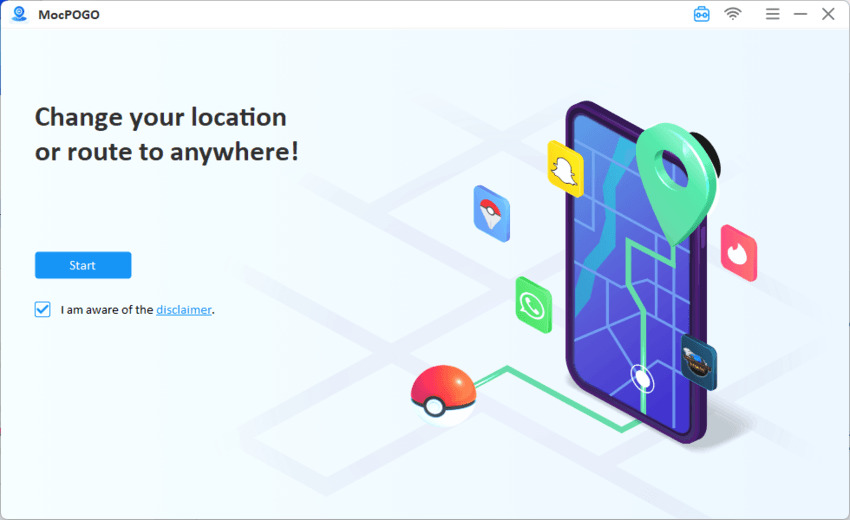
Step 1 Download the latest version of MocPOGO and install it on your computer. Open the tool and click on the Start button.
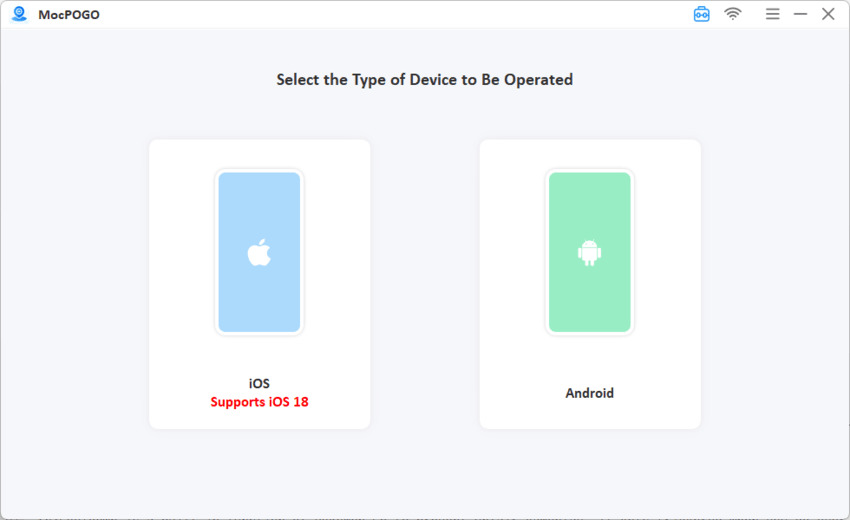
Step 2 Connect your device and then select Android or iOS.
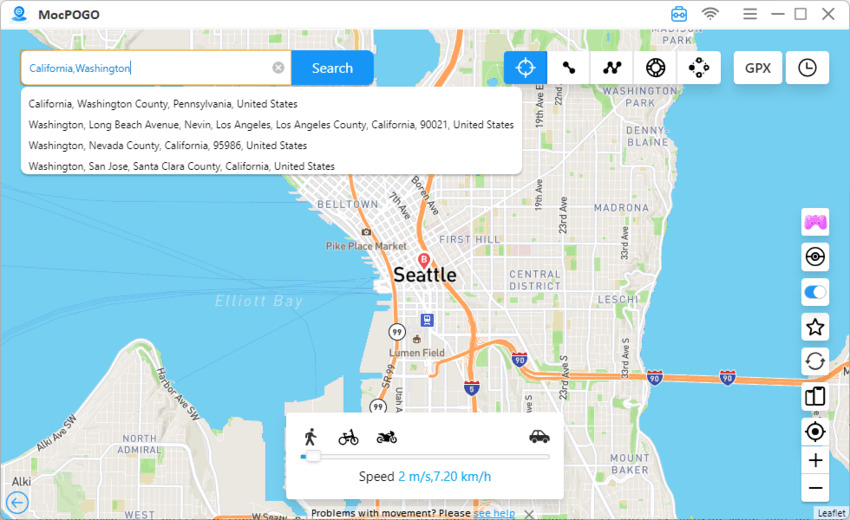
Step 3 Click on the Teleport button. Enter the location you want in the search bar and click Search.
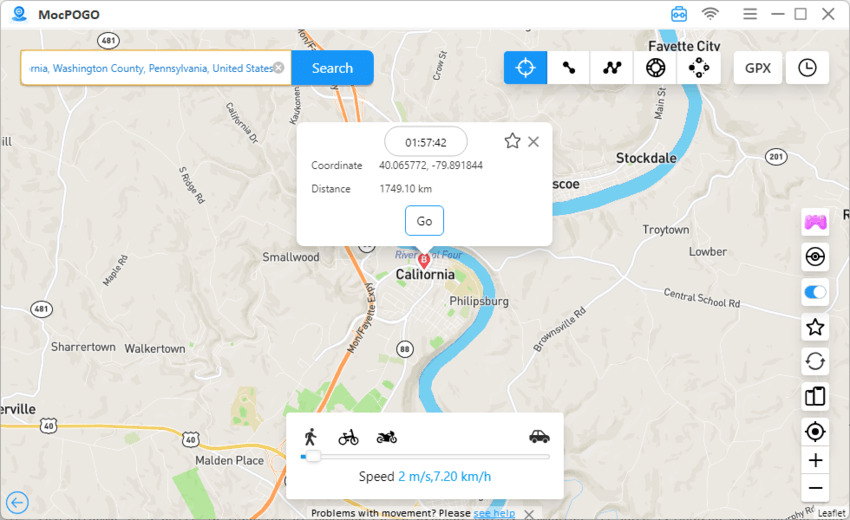
Step 4 Now, you will see the new location map. Click GO to instantly spoof the location.
This is the most effective solution if you want to fake location and stop tracking without anyone knowing.
Part 4. Comparison – Turning Off GPS vs. Using MocPOGO
When deciding how to protect your privacy, it’s important to understand the difference between simply turning off GPS and using a smarter solution like MocPOGO.
Here’s a clear comparison:
| Feature | Turning Off GPS | Using MocPOGO |
|---|---|---|
| Does the tracker notice? | Yes – shows “location unavailable” or stops updating | No – shows a normal (fake) location |
| Privacy protection | Partial – stops tracking but reveals you turned it off | High – hides your real location completely |
| Risk of being tracked | Low, but raises suspicion | Very low – tracker sees controlled, fake data |
| Setup difficulty | Easy (built-in settings) | Easy – simple setup with guided interface |
Why MocPOGO is the Better Choice
Turning off GPS may seem like the quickest fix, but it often leads to unwanted attention. On the other hand, MocPOGO lets you stop location tracking without turning off your location entirely.
Instead of cutting off access, you control what others see—making it the most effective way for users searching how to fake location while staying completely undetected.
Conclusion
Hidden tracking apps can pose serious privacy concerns, and while basic methods like turning off GPS may stop tracking, they often make it obvious that something has changed. This can lead to suspicion rather than true privacy.
If you want a smarter solution, using a tool like MocPOGO is the best approach. Instead of disabling location services, it lets you fake your location while keeping everything running normally—so no one knows you’ve made a change.
In short, MocPOGO offers the most effective way to protect your privacy, avoid detection, and take full control of your location data.


