


Signulous Pokemon Go Not Working? Here are Real Fixes!

Signulous is a third-party app installer that many Pokémon Go players use to sideload modified versions of the game on iPhone. But if you have been using it for a while, you already know the frustration: the app stops working without warning, certificates get revoked, and there is no reliable fix in sight.

Part 1. Why is Signulous Pokémon Go Not Working?
The issues with Signulous are not random, and they are not caused by anything you did wrong. They stem from a few recurring root causes that are baked into how third-party certificate-based installers work on iOS. Understanding these will help you see why temporary fixes keep failing and why a more permanent solution is worth considering.
- Apple frequently revokes enterprise certificates: Signulous distributes apps using enterprise developer certificates. Apple actively monitors and revokes these when misuse is detected, which instantly breaks all apps installed through that certificate.
- Modified apps are unstable by nature: Tweaked versions of Pokémon Go like iPogo are not official builds. Every Niantic update can break them, and there is always a lag before a patched version becomes available.
- iOS system updates break compatibility: Each new iOS version can change how apps are trusted and run, causing previously working installs to fail silently or crash on launch.
- Niantic’s anti-cheat system detects modified apps: Niantic continuously updates its detection methods. Modified apps installed through Signulous are a known target, putting your account at risk of a soft ban or permanent suspension.
Part 2. 7 Signs Signulous Pokémon Go is Not Working
Not sure if Signulous is the problem? The errors can look different depending on whether the certificate is revoked, the app is outdated, or Niantic has updated its detection. Here are the seven most common signs that something has gone wrong with your Signulous Pokémon Go setup:
1. “Unable to verify app” error after downloading. The app fails to install entirely.

2. App crashes immediately after opening, before the game even loads.
3. “Failed to detect location” (Error 12): The game launches but cannot read your GPS position.

4. Unable to log in due to account lock or persistent login failure.
5. “Untrusted Enterprise Developer” message: The certificate has expired or been revoked by Apple.

6. App disappears from your home screen after an iOS update without warning.
7. Game functions work but spoofing is detected, resulting in a soft ban or shadow ban from Niantic.
Part 3. How to Fix Signulous Pokémon Go Not Working
When Signulous Pokémon Go stops working, there are a few things you can try to get back into the game quickly. Keep in mind, though, that most of these are temporary workarounds rather than permanent solutions. Here is what you can do and why each fix has its limits.
Fix 1: Reinstall the app: Delete and re-download from Signulous. This may work briefly if the certificate is still active.
Fix 2: Re-trust the certificate: Go to Settings → General → VPN & Device Management and re-trust the Signulous developer profile.

Fix 3: Contact Signulous support: Report the issue to their team and wait for a certificate replacement.
Drawbacks of Temporary Fixes
These fixes are band-aids, not solutions. Here is why:
- Reinstalling does not help once the certificate is fully revoked.
- You are dependent on Signulous purchasing a new certificate, which takes time.
- Apple periodically clears enterprise certificates at scale, meaning this cycle repeats indefinitely.
Part 4. How to Spoof Pokémon Go without Signulous iOS
If you are tired of the certificate cycle, MocPOGO is the stable alternative. It works with the official Pokémon Go app, requires no enterprise certificate, and does not put your account at the same level of detection risk as modified app builds.
MocPOGO Core Advantages
- Bluetooth Spoofing: MocPOGO uses Bluetooth technology to directly change your device’s GPS location wirelessly. No sideloading and no revokes to worry about.
- Standard App support: Play the original Pokémon Go with full location control. No need for a modified APK or tweaked IPA.
- No jailbreak or root required: Works safely on standard, unmodified devices, keeping your phone secure and warranty intact.
- Built-in cooldown timer: Tracks how long you need to wait between location jumps to reduce ban risk.
- One-click teleport: Instantly move your GPS to any city or coordinate in the world.
- Joystick control: Navigate your in-game character in real time using keyboard controls.
- Simulate realistic movement: Set custom walking, biking, or driving routes at adjustable speeds to keep activity looking natural.
- Cross-platform support: Works on iPhone, Android, Mac, and Windows. Compatible with the latest iOS 26 and Android 16.

168,282 people have downloaded it.
- Spoof GPS wirelessly via Bluetooth on iOS and Android.
- Simulate GPS movement with custom speeds.
- Change the location of all location-based games/apps.
- Support GPS joystick to play AR game on PC.
- Built-in cooldown timer to avoid soft bans in games.
- Import GPX routes to simulate natural walking paths.
Step-by-step instructions for Bluetooth Spoofing on MocPOGO
Step 1 Download and install MocPOGO on your Android.

Step 2 Tap the “iOS option” at the top right to switch to iOS mode.

Step 3 Select Bluetooth Mode: In the MocPOGO interface, choose the Bluetooth Mode option to enable safe location spoofing for Pokemon Go.

Step 4 Pair via Bluetooth: After entering Bluetooth Mode, follow the on-screen instructions to pair your Android device with your iPhone directly.

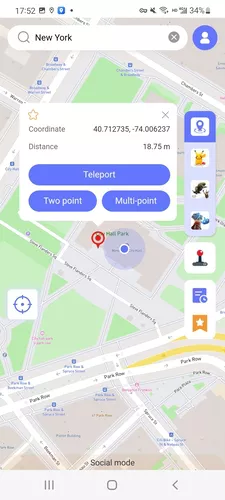
Step 5 Set your location: Search for or tap a location on the map, then click Teleport to instantly change your GPS position. Open Pokémon GO app on your iPhone. Your character should now appear at the new location.
Conclusion
Signulous Pokémon Go not working is not a one-time glitch. It is a structural problem with how certificate-based sideloading works on iOS. Every temporary fix buys a little time before the cycle repeats. If you want a reliable, long-term way to spoof Pokémon Go on iPhone without dealing with certificate revocations, MocPOGO Pokemon Go spoofer is the practical alternative. It works with the official app, requires no jailbreak, and gives you full GPS control from your computer.


