


[Full Explanation] Does Hinge Automatically Update Your Location?

You’ve just landed in a new city or traveled for work, eager to meet new people. You open Hinge and start swiping, only to notice an odd issue: all suggested profiles are still from your hometown miles away. Your phone GPS runs perfectly, so why does this happen?
The truth is: Hinge never updates your location automatically. Luckily, this problem is easy to solve. In this guide, you’ll learn what’s behind Hinge location.

Part 1. Actually, Hinge Doesn’t Update Location Automatically
Unlike many other dating apps that refresh your whereabouts in the background, your Hinge location is fixed to the city you set in your preferences, and it remains unchanged until you adjust it manually.
This rule is designed on purpose. Hinge focuses on helping users build genuine, meaningful connections rather than casual distance-based matches. If you haven’t modified your location settings for a long time, your profile will still be displayed in your former city. To be clear, Hinge won’t keep tracking your real-time GPS data.
Below are two easy manual methods, and you can pick the one that suits you best.
Method 1: Update via Hinge Preferences
- Launch Hinge and tap the profile icon at the bottom of the screen.
- Tap the Settings (gear) icon in the upper right corner.
- Tap Preferences > My Location (or My Neighborhood on some versions).
- Grant location permission as required, or directly search and select your new city manually.
- Save your changes.

Method 2: Update via Hinge Profile Page
- Tap the Profile tab, then tap Edit Profile.
- Tap the Location field.
- Allow location access, or enter your preferred city manually.
- Confirm and save.

Always keep this key point in mind: you have to adjust your location actively, since Hinge has no function to track or update your location automatically.
Part 2. Hinge Location Still Not Updating? Here Are Useful Tips
Even after manually updating your location, some users still experience location issues. Here are the most common problems and how to solve them quickly.
Problem 1: Hinge Fails to Update Location
- Disabled location permissions: Hinge needs location access to register where you are.
Fix: Go to Settings > Apps > Hinge > Permissions and turn on location. - Outdated app cache: Cached data can show the wrong location even after you’ve changed it.
Fix: Clear Hinge’s cache (Settings > Apps > Hinge > Clear Cache), then try again. - Unrefreshed app status: Sometimes changes take a few moments to show.
Fix: Force close Hinge, wait 30 seconds, then reopen and check. - Obsolete app version: Old Hinge versions may have location bugs.
Fix: Update Hinge to the latest version from your app store.
Problem 2: Hinge Shows the Wrong Location
- Poor GPS signal: Common indoors or in dense cities.
Fix: Go outside, ensure GPS is enabled, then manually update your location in Hinge again. - VPN connection conflict: A VPN can make your IP address appear in a different region.
Fix: Turn off your VPN, reload Hinge, and manually update your location. - Accidentally selected wrong city: You may pick the wrong destination city during manual setting.
Fix: Go back to Preferences, delete the current location, and re‑select the correct city. Double‑check spelling.
Part 3. Best Way to Change Your City on Hinge in Seconds
Sometimes refreshing your Hinge location isn’t enough. You need full control. Whether you’re traveling ahead, expanding your dating pool, or keeping your home address private, MocPOGO has you covered.
As a professional GPS location changer, MocPOGO lets you instantly jump to any place across the globe. It has become an essential helper for all Hinge users who want flexible location settings.
You can break free from Hinge’s rigid manual location update rules with MocPOGO. No matter whether you are preparing for a journey, protecting your personal privacy, or exploring dating circles in other regions, you can switch your Hinge location effortlessly within seconds.

168,282 people have downloaded it.
- Set any city on Hinge to update your outdated profiles.
- Expand your dating pool with a new Hinge location.
- Create fake locations to connect with people in any city.
- Support location spoofing for games like Pokemon GO.
- Save your favorite fake locations and switch in one click.
- Run seamlessly on Windows, Mac, iOS, and Android.
Core MocPOGO Advantages Optimized for Hinge
One-Click Fast Location Switch
Skip tedious in-app setting steps and slow GPS positioning delays. You can switch your target city on Hinge with just one tap, and the matching crowd will refresh right away, saving you plenty of time on repeated manual adjustments.
Global & Precision Location Spoofing
Set your location anywhere in the world, from any city down to a specific neighborhood. Hinge instantly shows you matches from that exact area, giving you both global reach and pinpoint accuracy.
Real Privacy Protection for Dating
Keep your exact home address private on Hinge. Set a reasonable nearby virtual location instead, so you can match local users normally while hiding your real whereabouts, effectively protecting your daily life privacy.
User‑Friendly for Anyone
You can change your Hinge location safely without jailbreaking your iPhone or rooting your Android device.
Full Compatibility with Various Dating Apps
MocPOGO works perfectly with most mainstream dating apps including Tinder, Bumble and Grindr. You can easily apply your customized virtual location to all these dating platforms.
Simple Steps to Change Your Hinge Location with MocPOGO
Follow these four simple steps to change your Hinge location in two minutes.
Step 1 Download and install the MocPOGO app on your iPhone or Android device.
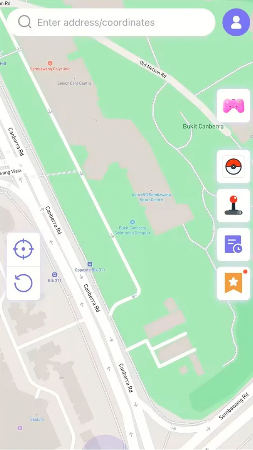
Step 2 Enter the target address or coordinates in the search box.
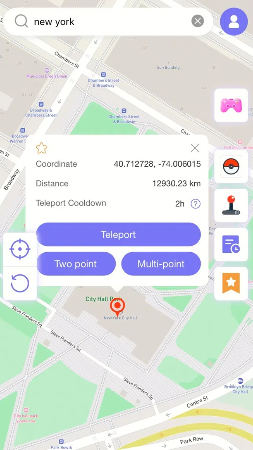
Step 3 Click Teleport to activate the new GPS location.
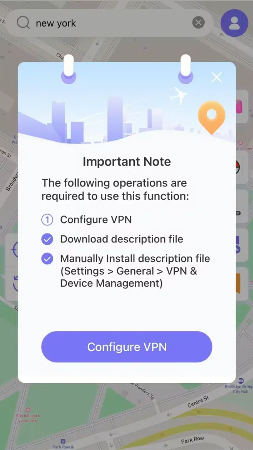
Step 4 MocPOGO for iOS will ask you to configure VPN, click on “Configure VPN” to go on.
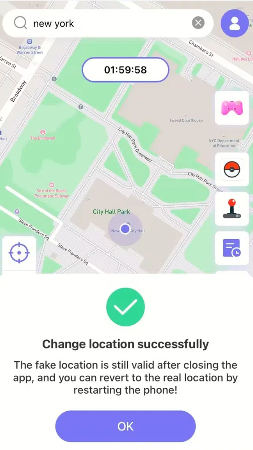
Step 5 Your device will now report the spoofed location to all apps, including Hinge. Open Hinge, Hinge will now show your spoofed city as your current location.
Part 4. FAQs About Hinge Location
Still have questions? Here are answers to the most common ones we’ve seen on forums and Reddit.
Q1. Does Hinge notify my matches when I change my location?
No. Location changes are completely silent. Your existing matches won’t be notified, and the change only affects who will see your profile going forward.
Q2. Can a VPN update my location on Hinge?
Not reliably. Hinge uses GPS, not your IP address, for location. A VPN alone won’t change your Hinge location. You’d need a dedicated GPS location changer for that.
Q3. How do I hide my location on Hinge?
You can’t completely remove your location. Hinge requires it for matching. However, you can set a nearby but non‑exact location (e.g., a public landmark instead of your home address) to keep your real address private.
Q4. Is it safe to use a location changer for Hinge?
Yes, when used responsibly. Avoid jumping between far‑away cities too quickly, and keep your activity patterns natural. A reliable tool like MocPOGO offers stable spoofing and movement simulation to help you stay under the radar.
Final Words
The short answer: Hinge does not automatically update your location. All location changes must be done manually, either through your preferences or profile settings.
If you aim to take full command of your in-app location, such as browsing local matches ahead of your trip, expanding your dating range or shielding your actual living address, MocPOGO Location Changer ranks as your most reliable pick. It requires no jailbreak or complicated technical operations, letting you enjoy unrestricted location flexibility right after opening Hinge.
Download MocPOGO today and start building new connections anywhere you wish.


