


[Latest] How to Change Your iCloud Location on iPhone Quickly

 MocPOGO
MocPOGO is the best location changer to change iPhone location without jailbreak in one click.
Changing your iCloud location can be handy if you’re dealing with apps that are not available in your region or if you want to access different content. However, the process isn’t as straightforward as it is on Android. Today, in this guide, we will show you how to change your iCloud location using easy methods. Ensure to read this guide till the end.

Part 1. How to Change Your iCloud Location in Settings
How to change my iCloud location? Apple allows users to manually update their location directly through the Settings app on iPhone. Here is how to change iCloud location via iPhone, iPad, Apple Vision Pro, Windows, Mac, and Online.
Key Prerequisites Before Changing iCloud Location on iPhone
Changing your iCloud location isn’t as simple as it looks. Apple enforces strict requirements to ensure the process runs smoothly. Before updating your iCloud location, there are several key prerequisites you need to address to avoid any issues:
- ✓ Check and use any remaining Apple ID balance. If you’re uncertain about your balance, verify it in your Apple account.
- ✓ Ensure to terminate any active subscriptions linked with your Apple ID. Apple does not allow location changes while subscriptions are active.
- ✓ If you have any pre-ordered apps, rented movies, or pending refunds, these transactions must be completed before you can proceed.
- ✓ Make sure that a valid payment method is available for the new country or region. This will help prevent billing issues or failed purchases when accessing the App Store.
Change iCloud Location on iPhone, iPad, or Apple Vision Pro
The steps to change your iCloud location are the same on iPhone, iPad, and Apple Vision Pro. You can follow these instructions on any of these devices. Here is how to change iCloud location on iPhone, iPad, or Vision Pro.
Step 1 Open “Settings” on your iPhone, iPad, or Apple Vision Pro.
Step 2 Tap on your Apple ID and select the “Media & Purchases” option. Hit “View Account” and sign in.
Step 3 Scroll down and choose the “Country/Region” option. Pick your new country and pursue the Terms and Conditions.

Step 4 Add a payment method from the new region to ensure smooth app purchases and subscriptions.
Change iCloud Location on Windows or Mac
Here are the step-by-step instructions on how to change your iCloud location on Windows or macOS.
Step 1 Open the Apple Music or Apple TV app on your Windows or macOS.
Step 2 On a Mac, in the menu bar, select the Account option and then choose “Account Settings.” Window users: click your name at the bottom of the sidebar and select the “View My Account” option.

Step 3 Sign in with your Apple ID and click the “Change Country or Region” option. Choose your new country or region and click on the “Done” button.
Step 4 Enter a valid payment method and click on the “Continue” button.
Change iCloud Location on Website
Apple also allows users to change their iCloud location via a web browser. Navigate to Apple’s official site and follow the instructions below.
Step 1 Navigate to account.apple.com from any web browser and sign in with your account.

Step 2 Click on “Personal Information” and select “Country/Region.”
Step 3 Choose a new Country/Region and confirm it. Enter a valid payment method and click on the “Continue” option.
Part 2. How to Change Your iCloud Location without Changing New Payment
Changing your iCloud location manually requires a valid payment method, which many users may not have. But don’t worry — there are ways to update your iCloud location without needing a payment method.
1. Use MocPOGO Location Changer
If you’re looking for a way to change iCloud location without changing the new payment method, MocPOGO is the best option. It allows you to update your iCloud region quickly and safely. The standout feature of this tool is that it offers an intuitive interface and works seamlessly with all iOS devices and versions, including the latest iPhone 17 and iOS 26.
168,282 people have downloaded it.
- Instantly change iPhone location without jailbreak.
- Safely change iPhone/iCloud location without anyone knowing or detection.
- Change iPhone location of all location-based games/apps, like Pokemon Go, Kippo and Zenly, etc.
- Quickly change Android location without root.
- Offer a straightforward interface, allowing users to change iCloud location without professional help.
How to Change iCloud Locationwith MocPOGO
Step 1Download and install the MocPOGO iOS app and launch it.
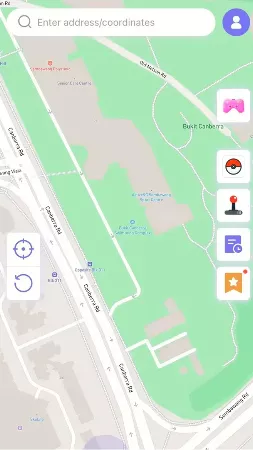
Step 2 Your current location will appear on your screen. Enter the target location in the search box to change your iCloud location.
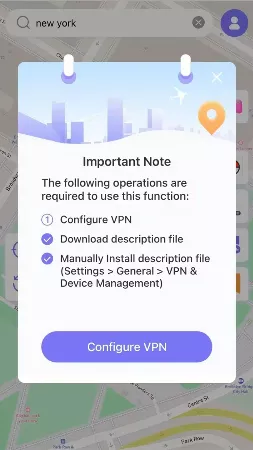
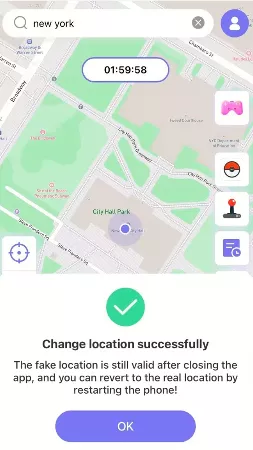
Step 3 Choose the “Teleport” option and click on “Configure VPN.” Within seconds, your iCloud location will be changed without a new payment method.
There is a MocPOGO Android app for you to change Android location without root.
Note:
You can also feel free to download MocPOGO Windows or Mac version to change iCloud location to anywhere on PC.
Also Read: Top 5 Ways to Change iPhone Location with a Computer
2. Use Norton VPN
The next method to change your iCloud location without a payment method is via VPN. Norton VPN is one of the top VPN providers today. With Norton VPN, users can easily change their iCloud location without entering a new payment method, allowing them to access region-specific apps, content, and services. Here is how to do it.

Step 1 Download and launch Norton VPN on your device.
Step 2 Select a new “Country.” Norton VPN provides a wide range of countries, including the UK.
Step 3 Hit the “Connect” button to change iCloud location.
Part 3. FAQs about How Change Your iCloud Location
Q1: Is it safe to change iCloud location with a location changer?
Yes. MocPOGO is one of the safest location changers available for iOS devices. The app doesn’t require jailbreak or any alteration. And you won’t get banned after spoofing location on iPhone.
Q2: How do I move my iCloud account?
Simply sign out of iCloud on your previous device and then log in on the new device to transfer your iCloud account.
Q3: Is it okay to change Apple ID location?
Yes, it is completely safe and legal to change the Apple ID location.
Q4: Is there a way to change your iCloud address?
Yes, there is a way to change your iCloud email address.
Conclusion
Changing your iCloud location can unlock a treasure of new apps and content options. In this guide, we have mentioned the top methods on how to change your iCloud location. Among them, MocPOGO iOS is the best option. This tool enables users to alter the iCould location without a new payment method.


